告别加班!Excel+Word批量生成人员档案,1分钟搞定100人
- 2026-04-07 15:19:46
告别加班!Excel+Word批量生成人员档案,1分钟搞定100人
你是不是还在为批量制作人员档案而发愁?每次从Excel复制姓名、性别、出生日期到Word模板,再一张张插入照片,重复操作枯燥又容易出错。尤其人事、行政岗,面对几十上百人,手动操作简直就是“加班神器”。
今天分享一段VBA代码,一键解决这个难题:
1. 自动读取Excel明细表; 2. 批量填入Word模板(姓名行自动缩进2字符,其他行顶格); 3. 从指定文件夹匹配同名照片,插入文档末尾并居中,保持原始尺寸不拉伸; 4. 瞬间生成所有人员独立文档,命名规范,省时省力! 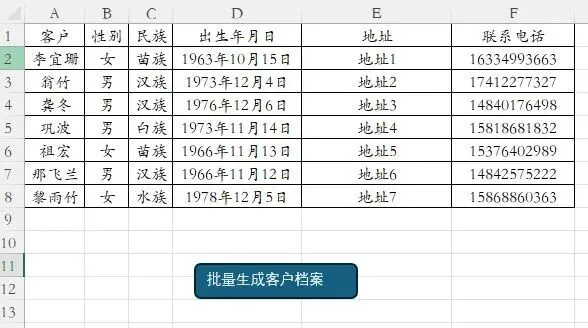


Sub BatchCreateDocs() Dim wdApp As Object Dim wdDoc As Object Dim wdRange As Object Dim wdInlineShape As Object Dim templatePath As String Dim outputFolder As String Dim picFolder As String Dim picFile As String Dim ws As Worksheet Dim lastRow As Long Dim i As Long Dim customer As String Dim gender As String Dim ethnicity As String Dim birthStr As String Dim address As String Dim phone As String templatePath = ThisWorkbook.Path & "\人员信息-模板.docx" outputFolder = ThisWorkbook.Path & "\人员文档\" picFolder = ThisWorkbook.Path & "\图片\" If Dir(templatePath) = "" Then MsgBox "未找到模板文件:" & vbCrLf & templatePath, vbCritical Exit Sub End If If Dir(outputFolder, vbDirectory) = "" Then MkDir outputFolder End If On Error Resume Next Set wdApp = GetObject(, "Word.Application") If Err.Number <> 0 Then Set wdApp = CreateObject("Word.Application") End If On Error GoTo 0 wdApp.Visible = False Set ws = ThisWorkbook.Sheets("Sheet1") lastRow = ws.Cells(ws.Rows.Count, "A").End(xlUp).Row For i = 2 To lastRow customer = Trim(ws.Cells(i, "A").Value) gender = Trim(ws.Cells(i, "B").Value) ethnicity = Trim(ws.Cells(i, "C").Value) If IsNumeric(ws.Cells(i, "D").Value) Then birthStr = Format(ws.Cells(i, "D").Value, "yyyy年mm月dd日") Else birthStr = ws.Cells(i, "D").Text End If address = Trim(ws.Cells(i, "E").Value) phone = Trim(ws.Cells(i, "F").Value) Set wdDoc = wdApp.Documents.Open(templatePath) With wdDoc.Content.Find .ClearFormatting .Replacement.ClearFormatting .Text = "姓名: , , ," .Replacement.Text = "姓名:" & customer & "," & gender & "," & ethnicity & "," .Execute Replace:=2 .Text = "生于 ," .Replacement.Text = "生于" & birthStr & "," .Execute Replace:=2 .Text = "地址: ," .Replacement.Text = "地址:" & address & "," .Execute Replace:=2 .Text = "电话: 。" .Replacement.Text = "电话:" & phone & "。" .Execute Replace:=2 .Text = "图片" .Replacement.Text = "" .Execute Replace:=2 End With picFile = picFolder & customer & ".jpg" If Dir(picFile) <> "" Then Set wdRange = wdDoc.Range(wdDoc.Content.End - 1, wdDoc.Content.End - 1) Set wdInlineShape = wdDoc.InlineShapes.AddPicture(picFile, False, True, wdRange) wdInlineShape.Range.ParagraphFormat.Alignment = 1 Else wdDoc.Content.InsertAfter vbCrLf & "[未找到图片:" & customer & ".jpg]" End If wdDoc.SaveAs2 outputFolder & customer & ".docx" wdDoc.Close False Set wdDoc = Nothing Next i wdApp.Quit Set wdApp = Nothing MsgBox "批量生成完成!文档保存在:" & vbCrLf & outputFolder, vbInformationEnd Sub文末有示例文件下载链接,你可以直接套用模板,修改数据即可。
📢 温馨提示由于公众号平台更改了推送规则,为确保您能及时收到Excel每日一学的原创分享,请关注公众号并设为星标⭐,同时欢迎转发、点赞、在看,让更多朋友一起提升效率!
📥 示例文件下载
👉 在公众号后台回复 “260217” 获取下载链接
更多示例:点击→EXECL VBA 合集
本文来自网友投稿或网络内容,如有侵犯您的权益请联系我们删除,联系邮箱:wyl860211@qq.com 。


