python自动化系列:批量导出 Excel 数据到 CSV 文件
- 2026-08-07 22:24:32
python自动化系列:批量导出 Excel 数据到 CSV 文件
作品介绍 作品名称:批量导出 Excel 数据到 CSV 文件 用到的库:os、pandas 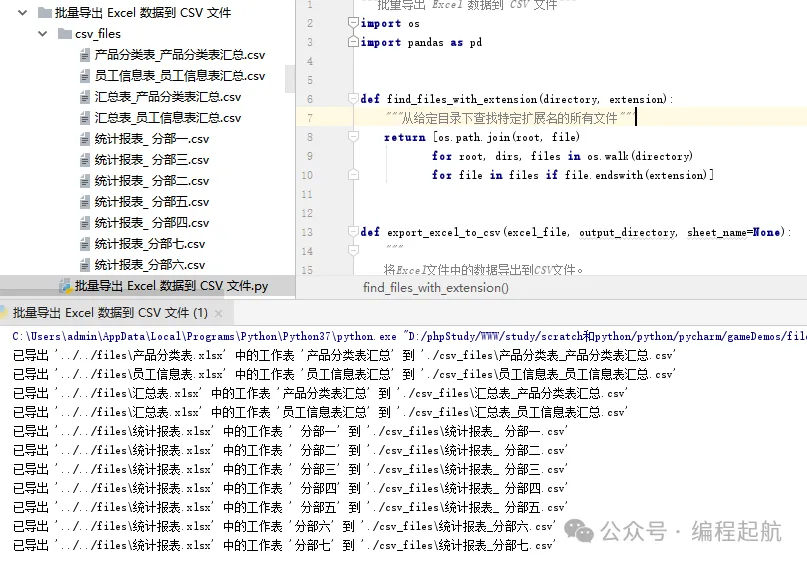

二、定义函数find_files_with_extension 三、将Excel文件中的数据导出到CSV文件 四、主逻辑 五、执行入口 六、结语  精选阅读
精选阅读
python自动化系列:抓取财经精选新闻 python自动化系列:一键重命名文件,轻松跟踪修改历史 python自动化系列:一键删除PDF文档密码
.xlsx格式),根据提供的工作表名称或所有工作表,将它们分别导出为CSV文件,并保存在指定的输出目录中。实现过程
一、导入必要的库
import osimport pandas as pd
def find_files_with_extension(directory, extension):"""从给定目录下查找特定扩展名的所有文件"""return [os.path.join(root, file)for root, dirs, files in os.walk(directory)for file in files if file.endswith(extension)]
def export_excel_to_csv(excel_file, output_directory, sheet_name=None):"""将Excel文件中的数据导出到CSV文件。:param excel_file: Excel文件路径:param output_directory: CSV文件输出目录:param sheet_name: 指定要导出的工作表名称;如果为None,则导出所有工作表"""# 确保输出目录存在os.makedirs(output_directory, exist_ok=True)# 读取Excel文件xls = pd.read_excel(excel_file, sheet_name=sheet_name)base_filename = os.path.splitext(os.path.basename(excel_file))[0]if isinstance(xls, dict): # 如果有多个工作表for sheet, df in xls.items():csv_filename = f"{base_filename}_{sheet}.csv"csv_filepath = os.path.join(output_directory, csv_filename)df.to_csv(csv_filepath, index=False, encoding='utf-8-sig') # 使用utf-8-sig支持中文字符print(f"已导出 '{excel_file}' 中的工作表 '{sheet}' 到 '{csv_filepath}'")else: # 如果只有一个工作表csv_filename = f"{base_filename}.csv"csv_filepath = os.path.join(output_directory, csv_filename)xls.to_csv(csv_filepath, index=False, encoding='utf-8-sig')print(f"已导出 '{excel_file}' 到 '{csv_filepath}'")
def main(input_directory, output_directory, sheet_name=None):# 查找所有Excel文件excel_files = find_files_with_extension(input_directory, '.xlsx')# 遍历所有Excel文件并导出为CSV文件for excel_file in excel_files:export_excel_to_csv(excel_file, output_directory, sheet_name)
if __name__ == "__main__":input_directory = '../../files' # 替换为你的Excel文件所在的目录路径output_directory = './csv_files' # 替换为你的CSV文件输出目录路径sheet_name = None # 如果只想导出特定工作表,请指定其名称;否则设为None导出所有工作表main(input_directory, output_directory, sheet_name)
以上就是本次分享的全部内容,如果你有任何疑问或想要分享的经验,评论区永远为你敞开。你的每一个点赞和转发,都是对我们最大的支持和鼓励!
再次感谢你的阅读,期待在下一次分享中与你相见!
精选阅读python自动化系列:将Excel表格中的学生信息自动填充到一个word文档
python自动化系列:将Excel表格中的学生多条信息自动填充到一个Word文档
python自动化系列:Python脚本实现GIF动画的快速生成
python自动化系列:一键将Excel多页数据批量转换为Word文档
python自动化系列:如何使用Python为PDF文件添加密码保护
python自动化系列:自动抓取网站文章的工具(有知有行-E大)
python自动化系列:一键批量导出Excel工作表为图片,简化报告制作流程
python自动化系列:基于Excel数据自动生成员工工资调整通知
本文来自网友投稿或网络内容,如有侵犯您的权益请联系我们删除,联系邮箱:wyl860211@qq.com 。
随机文章
-
 10个月宝宝每天需要喝多少奶粉?
- 一张图理清 Excel 全部高频函数
- 办公室人必看!Excel数据分析VLOOKUP一篇通
- Excel技巧:数据涨跌自动变色带箭头,报表瞬间高级直观
- 备战高考、高三励志、高考意义班会ppt:高校、高考、高三(含视频)
- Excel VBA 初识别
- 重庆大学PPT:先进传感材料及其电力应用(附下载)
- 工具买了七八套、业务还在靠Excel?企业数字化"如何用一套CRM取代七八套工具的“数据孤岛”?
- 一套 PPT 能否兼顾销售与解决方案?聊聊数据域项目培训难题
- 数据分析Excel八大常用函数——全流程!
- 秋季上新学期开学第一课主题班会PPT课件:从《功夫女足》出发,做自己的冠军

