轻量高效实现Excel至Java对象映射,支持各种复杂Excel
- 2026-09-21 21:49:32
环境:Spring Boot 3.5.0
1. 简介
Poiji是一个小巧且线程安全的Java库,它提供了一种将Excel表格数据单向映射到Java类的方式。从某种意义上说,它允许我们将指定Excel数据中的每一行转换为Java对象。Poiji在底层使用Apache Poi(用于处理微软文档的Java API)来完成这一映射过程。
在本篇文章中,我们将深入且详尽地介绍如何运用Poiji库来实现Excel数据到Java对象的映射操作。
<dependency><groupId>com.github.ozlerhakan</groupId><artifactId>poiji</artifactId><version>5.2.0</version><scope>compile</scope></dependency>
https://mvnrepository.com/artifact/com.github.ozlerhakan/poiji
com.poiji.bind.Poiji.fromExcel 结构Poiji#fromExcel(File, Class<T>)Poiji#fromExcel(File, Class<T>, Consumer<? super T>)Poiji#fromExcel(File, Class<T>, PoijiOptions)Poiji#fromExcel(File, Class<T>, PoijiOptions, Consumer<? super T>)Poiji#fromExcel(InputStream, PoijiExcelType, Class<T>)Poiji#fromExcel(InputStream, PoijiExcelType, Class<T>, Consumer<? super T>)Poiji#fromExcel(InputStream, PoijiExcelType, Class<T>, PoijiOptions)Poiji#fromExcel(InputStream, PoijiExcelType, Class<T>, PoijiOptions, Consumer<? super T>)Poiji#fromExcel(Sheet, Class<T>)Poiji#fromExcel(Sheet, Class<T>, PoijiOptions)Poiji#fromExcel(Sheet, Class<T>, PoijiOptions, Consumer<? super T>)Poiji#fromExcelProperties(File, Class<T>)Poiji#fromExcelProperties(File, Class<T>, PoijiOptions)Poiji#fromExcelProperties(InputStream, PoijiExcelType, Class<T>)Poiji#fromExcelProperties(InputStream, PoijiExcelType, Class<T>, PoijiOptions)
com.poiji.option.PoijiOptions.PoijiOptionsBuilder 结构
PoijiOptionsBuilder.settings().build().dateLenient(boolean).dateRegex(String).timeRegex(String).dateTimeRegex(String).datePattern(String).dateFormatter(DateTimeFormatter).timeFormatter(DateTimeFormatter).dateTimeFormatter(DateTimeFormatter).ignoreHiddenSheets(boolean).password(String).preferNullOverDefault(boolean).settings(int).sheetIndex(int).sheetName(String).skip(int).limit(int).trimCellValue(boolean).headerStart(int).headerCount(int).withCasting(Casting).withFormatting(Formatting).caseInsensitive(boolean).ignoreWhitespaces(boolean).poijiNumberFormat(PoijiNumberFormat).poijiLogCellFormat(PoijiLogCellFormat).disableXLSXNumberCellFormat().addListDelimiter(String).setLocale(java.util.Locale).rawData(boolean).setIgnoreFileExtension(boolean)
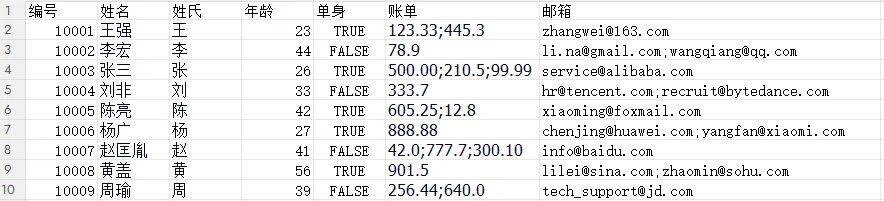
public class Employee {// 可选地,我们可通过ExcelRow注解访问每行项的索引。注解变量应为int、double、float或long类型@ExcelRowprivate int rowIndex;// 字段必须使用@ExcelCell注解并指定其属性,才能从目标Excel工作表的正确坐标获取值。// 注解字段可以是受保护、私有或公有的修饰符。该字段可以是布尔型、整型、长整型、浮点型、双精度型,或其包装类。// 你还可以添加 java.util.Date、java.time.LocalDate、java.time.LocalTime、java.time.LocalDateTime 以及 String 类型的字段。@ExcelCell(0)private long employeeId;@ExcelCell(1)private String name;@ExcelCell(2)private String surname;@ExcelCell(3)private int age;@ExcelCell(4)private boolean single;// 如果某列包含多个值,可通过列表字段获取它们。列表字段可存储以下类型的项目:BigDecimal、Long、Double、Float、Integer、Boolean 和 String。@ExcelCellName("emails")List<String> emails;@ExcelCell(5)List<BigDecimal> bills;// 无需使用getter/setter方法将Excel单元格映射到字段}
File file = new File("C:\\Users\\Administrator\\Desktop\\employees.xlsx");PoijiOptions options = PoijiOptions.PoijiOptionsBuilder.settings().addListDelimiter(";").build();List<Employee> employees = Poiji.fromExcel(file, Employee.class, options);System.err.println(employees) ;// 或者InputStream stream = new FileInputStream(file);employees = Poiji.fromExcel(stream, PoijiExcelType.XLSX, Employee.class, options);System.out.println(employees) ;

默认情况下,Poiji 会忽略 Excel 数据的标题行。若需忽略数据的第一行,需使用 PoijiOptions 进行设置,如下示例:
PoijiOptions options = PoijiOptions.PoijiOptionsBuilder// 跳过的行数.settings(1)// 设置分隔符.addListDelimiter(";").build();
@ExcelSheet("Sheet2")public classEmployee{}
受保护的Excel文件
假设你的Excel文件设置了密码保护,可通过PoijiOptionsBuilder定义密码以读取行数据:
PoijiOptions options = PoijiOptionsBuilder.settings().addListDelimiter(";").password("123123").build();
使用 @ExcelCellName,我们可以直接通过列名读取数值。
public classEmployee{@ExcelCellName("姓名")private String name;}
默认情况下,@ExcelCellName 区分大小写,且 Excel 文件不应包含重复的列名。不过,你可以通过 PoijiOptionsBuilder#caseInsensitive(boolean) 方法调整此特性,并使用 PoijiOptionsBuilder#ignoreWhitespaces(boolean) 忽略空格。
使用继承
我们定义的数据模型还可以使用继承关系,如下示例:
public abstract class BaseEntity {@ExcelCell(1)protected String name;@ExcelCell(3)protected int age;}// 子类public class Employee extends BaseEntity {@ExcelRowprivate int rowIndex;@ExcelCell(0)private long employeeId;@ExcelCell(2)private String surname;@ExcelCell(4)private boolean single;@ExcelCellName("emails")List<String> emails;@ExcelCell(5)List<BigDecimal> bills;}
测试示例
File file = new File("C:\\Users\\Administrator\\Desktop\\employees.xlsx");PoijiOptions options = PoijiOptionsBuilder.settings().addListDelimiter(";").password("123123").build();List<Employee> employees = Poiji.fromExcel(file, Employee.class, options);System.err.println(employees.get(0));
输出结果
Employee [rowIndex=1,employeeId=10001,surname=王,single=true,emails=null,bills=[123.33, 445.3],name=王强,age=23]
复杂Excel读取

@ExcelSheet("Sheet2")public class PersonCreditInfo {@ExcelCellName("编号")private Integer no;@ExcelCellRangeprivate PersonInfo personInfo;@ExcelCellRangeprivate CardInfo cardInfo;public static class PersonInfo {@ExcelCellName("姓名")private String name;@ExcelCellName("年龄")private Integer age;@ExcelCellName("城市")private String city;@ExcelCellName("国家")private String state;@ExcelCellName("邮编")private String zipCode;}public static class CardInfo {@ExcelCellName("类型")private String type;@ExcelCellName("末尾号码")private String last4Digits;@ExcelCellName("有效期")private String expirationDate;}}
File file = new File("C:\\Users\\Administrator\\Desktop\\employees.xlsx");PoijiOptions options = PoijiOptions.PoijiOptionsBuilder.settings().headerCount(2).build();List<PersonCreditInfo> persons = Poiji.fromExcel(file, PersonCreditInfo.class, options);System.err.println(persons);

处理超大Excel文件(无需全部加载内存)
运行时数据处理/过滤
数据库批量插入
Poiji.fromExcel(file, Employee.class, options, employee -> {System.err.println(employee) ;});
输出结果

可以通过Casting接口创建自己的转换实现,而无需依赖默认的Poiji转换配置。
public class ModifiedBooleanCasting extends DefaultCasting {@Overrideprotected Boolean booleanValue(String value, String sheetName, int row, int col, PoijiOptions options) {if (!value.equals("TRUE") && !value.equals("FLASE")) {return onError(value, sheetName, row, col, new RuntimeException("数据类型错误"), options.preferNullOverDefault() ? null : false);} else {return value.equals("y");}}}
使用
PoijiOptions options = PoijiOptions.PoijiOptionsBuilder.settings().withCasting(new ModifiedBooleanCasting()).password("123123").build();
https://github.com/ozlerhakan/poiji
性能优化!Spring Boot 一个注解轻松搞定百万数据 Excel 导出,低内存
高级开发!自定义@RequestMapping深度整合熔断降级功能
性能调优实战:Spring Boot 通过多线程处理SQL IN语句大量值的优化方案
技术专家!Spring AOP + Nacos + Prometheus 实现动态限流及实时监控