SolidWorks*Excel+VBA-缩略图,淦!
- 2026-09-19 13:50:52
SolidWorks*Excel+VBA-缩略图,淦!先看看再吐槽 原本是个很简单的功能,但是,真的淦! 方法:GetPreviewBitmap 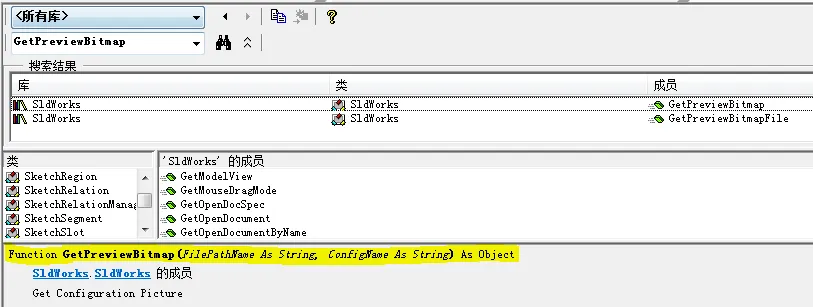
看说明就是传个模型全名称和配置,没什么特别的。 在反复尝试了N次,VBA总是报“自动化错误”。 去官网搂了一眼 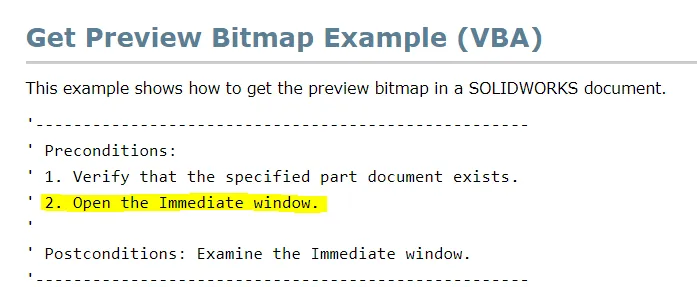
这第二条很可疑啊,跟即时窗口有啥关系? 于是,抛开Excel,直接在SW的VBA编程环境中调用,居然能行了。 所以代码动作顺序就成了这样 :Excel中呼出窗体,单元格选择事件,跳转到SW宏获取图片,传回Excel刷新窗体显示。
 Excel VBA部分1,Thisworkbook模块,触发事件 Excel VBA部分2,标准模块 SW VBA模块中 两边都有,老朋友了,毕竟又得拿注册表传数据。 
已关注
关注
重播 分享 赞
:Excel中呼出窗体,单元格选择事件,跳转到SW宏获取图片,传回Excel刷新窗体显示。Private Sub Workbook_SheetSelectionChange(ByVal Sh As Object, ByVal Target As Range)Dim SwModel As String, regkey As StringIf PreViewForm.Visible = True ThenWith ThisWorkbook.ActiveSheetIf Target.Rows.Count = 1 And Target.Columns.Count = 1 ThenSwModel = .Cells(Selection.Row, 2) & "\" & .Cells(Selection.Row, 3) & .Cells(Selection.Row, 4)regkey = "HKEY_CURRENT_USER\Software\Microsoft\Office\" & Application.Version & "\Excel\Options\SwModel"myregedit regkey, SwModel, "REG_SZ", "W"Call ModelPreViews("Events")End IfEnd WithEnd IfEnd Sub
Sub ModelPreViews(RunMethod As String) '查看缩略图Dim swApp As SldWorks.SldWorks, SwMacro As StringOn Error Resume NextSet swApp = GetObject(, "SldWorks.Application")If swApp Is Nothing ThenMsgBox "请先打开SolidWorks!", vbExclamation, "不正经的机械仙人"Exit SubEnd IfSwMacro = ThisWorkbook.Path & "\GetPreView.swp"If PreViewForm.Visible = True ThenIf RunMethod = "Events" Then swApp.RunMacro SwMacro, "Macro11", "ModelPreViews"ElseModelPreViews_Next "", "标题"PreViewForm.Show (0)End IfSet swApp = NothingEnd SubSub ModelPreViews_Next(P As String, Tit As String) '从SW端回传刷新数据PreViewForm.Image1.Picture = LoadPicture(P)PreViewForm.Label1.Caption = TitEnd Sub
Sub ModelPreViews() '查看缩略图Dim swApp As SldWorks.SldWorks, pic As StdPicture, xlapp As ObjectDim SwModel As String, regkey As String, filepath As StringSet swApp = Application.SldWorksSet xlapp = GetObject(, "Excel.Application")regkey = "HKEY_CURRENT_USER\Software\Microsoft\Office\" & xlapp.Version & "\Excel\Options\SwModel"SwModel = myregedit(regkey, "", "", "R")filepath = swApp.GetCurrentMacroPathFolderSet pic = swApp.GetPreviewBitmap(SwModel, "默认")If pic Is Nothing Thenxlapp.Run "'" & filepath & "\SW-File Systerm.xlsm'!ModelPreViews_Next", "", "标题"Elsestdole.SavePicture pic, filepath & "\PreView.jpg"xlapp.Run "'" & filepath & "\SW-File Systerm.xlsm'!ModelPreViews_Next", filepath & "\PreView.jpg", SwModelEnd IfSet pic = NothingSet swApp = NothingSet xlapp = NothingEnd Sub
Function myregedit(mykey As String, myval As Variant, mytype As String, mymod As String) As VariantDim oWshellSet oWshell = CreateObject("WScript.Shell")Select Case TrueCase mymod = "R" '读myregedit = oWshell.RegRead(mykey)Case mymod = "W" '写oWshell.RegWrite mykey, myval, mytypeCase mymod = "D" '删oWshell.RegDelete mykeyEnd SelectSet oWshell = NothingEnd Function
本文来自网友投稿或网络内容,如有侵犯您的权益请联系我们删除,联系邮箱:wyl860211@qq.com 。

