SolidWorks*Excel+VBA-BOM加个插图,吧
- 2026-07-21 12:03:02
SolidWorks*Excel+VBA-BOM加个插图,吧不知何时起,BOM也开始卷了起来,部件都带上了缩略图,便于识别。 但是吧,Solidworks获取的预览图空白部分太多,就像这样,占地方,实际内容部分大小也就1/3左右,图片调小了根本看不清,更何况表格清单内把图片所在单元格调太大也不合适。 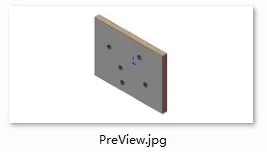
所以,这图得裁掉一部分,这个用Excel的VBA方法就可实现。 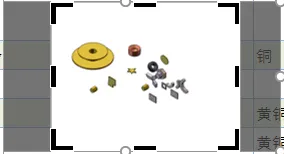
图像,按钮,图表,形状这些元素在Excel的VBA对象中都属于shape类。
主体程序大概就这样 关于程序中获取图像的方法,也偷了个懒,借用了之前窗口预览图的相关功能代码。 如果打开了缩略图窗口,再插入图片,会看到十分炸裂的一幕

已关注
关注
重播 分享 赞
Set shp = .Shapes.AddPicture(mypic, msoFalse, msoTrue, InsRng.Left, InsRng.Top, -1, -1)shpnum = .Shapes.Count '所有形状的数量shp.PictureFormat.CropLeft = (shp.Width - shp.Height) / 2'裁剪左边shp.PictureFormat.CropRight = (shp.Width - shp.Height) / 2'裁剪右边shp.CopyPicture: shp.Delete: .Paste'复制图像部分,删除原图,然后再粘贴Set shp = .Shapes.Item(shpnum)'重新获取粘贴后的图像'之所以搞这么复杂,就是为了彻底去掉裁剪的部分
Sub InsPreviewPic() 'BOM插入预览图Dim swModel As String, SwMacro As String, regkey As String, i As LongDim shp As Shape, picH As Long, picW As Long, shpnum As LongDim cH As Long, cW As Long, scal As Double, j As Integer, InsRng As RangeDim mypic As String, pictmp As Stringi = 3: SetGolDicWith ThisWorkbook.ActiveSheetCall DelPreviewPicSwMacro = ThisWorkbook.Path & "\GetPreViewA.swp"regkey = "HKEY_CURRENT_USER\Software\Microsoft\Office\" & Application.Version & "\Excel\Options\SwModel"If swApp Is Nothing Then Set swApp = GetObject(, "SldWorks.Application")Do While .Cells(i, PropTitDicA("文件全名")) <> ""mypic = ThisWorkbook.Path & "\PreView.jpg"If Dir(mypic) <> "" Then Kill mypicswModel = .Cells(i, PropTitDicA("文件全名"))myregedit regkey, swModel, "REG_SZ", "W"swApp.RunMacro SwMacro, "GetPreViewA1", "GetPictures"If Dir(mypic) <> "" Then.Rows(i).RowHeight = 90Set InsRng = .Cells(i, PropTitDicA("预览图"))Application.StatusBar = "正在插入图片:" & .Cells(i, PropTitDicA("文件全名"))cH = InsRng.Height: cW = InsRng.WidthSet shp = .Shapes.AddPicture(mypic, msoFalse, msoTrue, InsRng.Left, InsRng.Top, -1, -1)shpnum = .Shapes.Countshp.PictureFormat.CropLeft = (shp.Width - shp.Height) / 2shp.PictureFormat.CropRight = (shp.Width - shp.Height) / 2shp.CopyPicture: shp.Delete: .PasteSet shp = .Shapes.Item(shpnum)With shp.LockAspectRatio = msoTruepicH = .Height: picW = .WidthIf ((cH - 4) / picH) < ((cW - 4) / picW) Thenscal = (cH - 4) / picHElsescal = (cW - 4) / picWEnd If.Height = .Height * scal.Top = InsRng.Top + (cH - .Height) / 2: .Left = InsRng.Left + (cW - .Width) / 2End WithEnd Ifi = i + 1LoopEnd WithApplication.StatusBar = FalseSet swApp = NothingMsgBox "模型预览图插入完毕!", vbInformation, "不正经的机械仙人"End SubSub DelPreviewPic() '清除BOM预览图Dim shp As Shape, i As LongWith ThisWorkbook.ActiveSheetSetGolDicFor Each shp In .ShapesIf shp.Type = msoPicture Then shp.DeleteNexti = 3Do While .Cells(i, PropTitDicA("文件全名")) <> "".Rows(i).RowHeight = 22i = i + 1LoopEnd WithEnd Sub
模型缩略图 公众号:不正经的机械仙人
SolidWorks×Excel+VBA-缩略图,淦!
已关注
关注
重播 分享 赞
本文来自网友投稿或网络内容,如有侵犯您的权益请联系我们删除,联系邮箱:wyl860211@qq.com 。
随机文章
-
 10个月宝宝每天需要喝多少奶粉?
- 【护理教学】低钾血症的护理PPT|补钾四原则详解+临床表现速记+心电图特征判读
- 员工绩效考核培训ppt
- 别一上来就找模板!掌握这套思路,让你的PPT会“说话”
- 我发现 Codex 做 PPT 最好用的地方,不是生成 PPT
- 免陪照护PPT,传统陪护模式的痛点解析,临床困境课件
- 国家局2026版药物GCP官方培训PPT及视频!
- 用好PPT逻辑图轻松让汇报脱颖而出
- 庆祝建党105周年大会专题学习ppt59至高礼遇致敬功勋,牢记三个务必焦点访谈
- 质量管理部6月份工作总结及规划PPT汇报模板,QE工程师的福音
- 路演融资就靠它!融资路演PPT模板44套,含商业模式/市场分析/财务预测页,投资人一眼看中

