Java教程:如何使用EasyExcel自定义监听器读取随机区域报表数据
- 2026-10-24 03:06:27
Java教程:如何使用EasyExcel自定义监听器读取随机区域报表数据
前言:
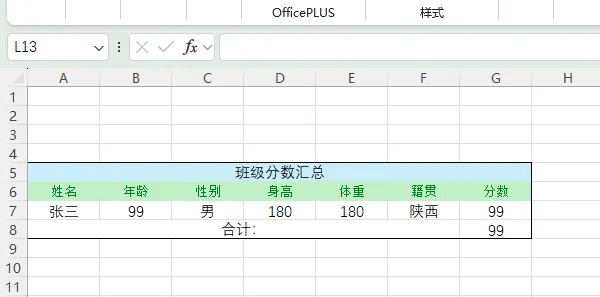
作者在项目中做Excel报表导入时,有这样的一个需求,就是说Excel里它的数据位置是不固定的,有时在上边,有时在中间,并非我们常见的第一行是表头,第二行以下是数据列。
比如这样:
再比如这样:
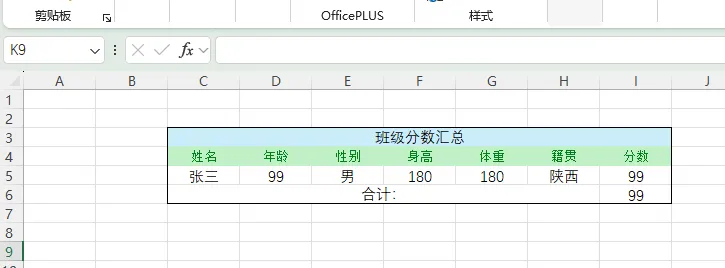
这时就不能直接使用EasyExcel来读取了,那么能不能让程序扫描全部数据,拿到表头位置索引后,在逐行读取数据行,这样无论报表在哪个位置,我们都不用手动指定相应位置,在哪都能自动读取?
其实EasyExcel是支持的,它有一个方法是可以使用自定义监听器的!
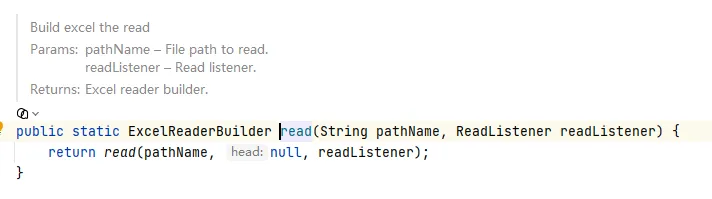
接下来我们就可以着手操作去实现这个读取监听器了!
第一步、引入pom依赖
因为本次使用的是EasyExcel,所以需要引入依赖
<!-- EasyExcel --><dependency><groupId>com.alibaba</groupId><artifactId>easyexcel</artifactId><version>2.2.1</version></dependency>
第二步、编写实体类
首先编写好用来接收数据的类
import lombok.Data;/*** 分数明细* @author 首席摸鱼师*/@Datapublic class ScoreDetailVO {/*** 姓名*/private String name;/*** 年龄*/private String age;/*** 性别*/private String sex;/*** 身高*/private String height;/*** 体重*/private String weight;/*** 籍贯*/private String nativePlace;/*** 分数*/private String score;}
第三步、编写明细读取监听器
这一步是核心,重点编写如何读取所有内容来筛选需要的表头和索引
import com.alibaba.excel.context.AnalysisContext;import com.alibaba.excel.event.AnalysisEventListener;import org.slf4j.Logger;import org.slf4j.LoggerFactory;import java.util.ArrayList;import java.util.HashMap;import java.util.List;import java.util.Map;/*** 分数明细监听器** @author 首席摸鱼师*/public class ScoreDetailListener extends AnalysisEventListener<Map<Integer, String>> {/*** 日志*/private static final Logger logger = LoggerFactory.getLogger(ScoreDetailListener.class);/*** 分数明细*/private final List<ScoreDetailVO> scoreDetailVOS = new ArrayList<>();/*** 是否找到表头*/private boolean findHeader = false;/*** 表头行索引(从0开始)*/private int headerRowIndex = -1;/*** 是否读到截止行(汇总行)*/private boolean readFinished = false;/*** 表头列索引*/private final Map<String, Integer> fieldToColIndex = new HashMap<>();/*** 字段映射(关键词匹配 → 实体字段)*/private static final List<String> FIELD_LIST = new ArrayList<>();static {FIELD_LIST.add("姓名");FIELD_LIST.add("年龄");FIELD_LIST.add("性别");FIELD_LIST.add("身高");FIELD_LIST.add("体重");FIELD_LIST.add("籍贯");FIELD_LIST.add("分数");}/*** 分数读取*/@Overridepublic void invoke(Map<Integer, String> rowMap, AnalysisContext context) {// 已经读完,直接跳过if (readFinished) {return;}int currentRowIndex = context.readRowHolder().getRowIndex();String rowString = rowMap.values().toString();// ===================== 截止行判断 =====================if (isSummaryRow(rowString)) {readFinished = true;return;}// ===================== 自动识别表头 =====================if (!findHeader) {if (isHeaderRow(rowMap)) {buildHeaderIndex(rowMap);findHeader = true;headerRowIndex = currentRowIndex;}return;}// ====================== 3. 表头之后的行 → 才是交易明细 ======================if (currentRowIndex <= headerRowIndex) {return;}// 开始解析交易数据try {ScoreDetailVO detail = new ScoreDetailVO();detail.setName(FIELD_LIST.get(0));detail.setAge(FIELD_LIST.get(1));detail.setSex(FIELD_LIST.get(2));detail.setHeight(FIELD_LIST.get(3));detail.setWeight(FIELD_LIST.get(4));detail.setNativePlace(FIELD_LIST.get(5));detail.setScore(FIELD_LIST.get(6));scoreDetailVOS.add(detail);} catch (Exception e) {logger.error("明细解析异常,原因:", e);throw new RuntimeException("明细解析异常");}}// 判断是不是表头行private boolean isHeaderRow(Map<Integer, String> rowMap) {String content = rowMap.values().toString();int matchCount = 0;for (String key : FIELD_LIST) {if (content.contains(key)) {matchCount++;}}return matchCount >= FIELD_LIST.size();}// 建立表头:列名 → 列索引private void buildHeaderIndex(Map<Integer, String> rowMap) {for (Map.Entry<Integer, String> entry : rowMap.entrySet()) {Integer colIndex = entry.getKey();String colName = entry.getValue();if (colName == null) {continue;}if (FIELD_LIST.contains(colName)) {fieldToColIndex.put(colName, colIndex);}}}/*** 判断当前行是不是【汇总/小计/截止行】*/private boolean isSummaryRow(String row) {return row.contains("合计:");}@Overridepublic void doAfterAllAnalysed(AnalysisContext context) {System.out.println("✅ 读取完成");System.out.println("📊 表头行索引:" + headerRowIndex);System.out.println("📦 有效条数:" + scoreDetailVOS.size());}// ====================== 工具方法:从Map取单元格 ======================private String get(Map<Integer, String> map, String fieldName) {Integer col = fieldToColIndex.get(fieldName);if (col == null) {return null;}String val = map.get(col);return val == null ? null : val.trim();}/*** 获取结果*/public List<ScoreDetailVO> getScoreDetailVOList() {return scoreDetailVOS;}}
这里的FIELD_LIST其实就是我们需要找到的所有表头,不限位置,此监听器会自动读取所有行数与表头索引,isSummaryRow方法是用来判断结尾,因为我们不需要合计数据,故读取到此。
第四步、编写执行方法
public static void main(String[] args) {String filePath = "E:\\temp\\2026-06-08.xlsx";ScoreDetailListener listener = new ScoreDetailListener();EasyExcel.read(filePath, listener).sheet().doRead();System.out.println("读取分数明细:" + JSONObject.toJSONString(listener.getScoreDetailVOList()));}
此Main是将Excel文件读取打印
结果如下:

非常简单!已经完美读出数据。
我是摸鱼师,一个从不希望被世界遗忘的博主,致力于编写更多更有趣的文章~
本文来自网友投稿或网络内容,如有侵犯您的权益请联系我们删除,联系邮箱:wyl860211@qq.com 。

