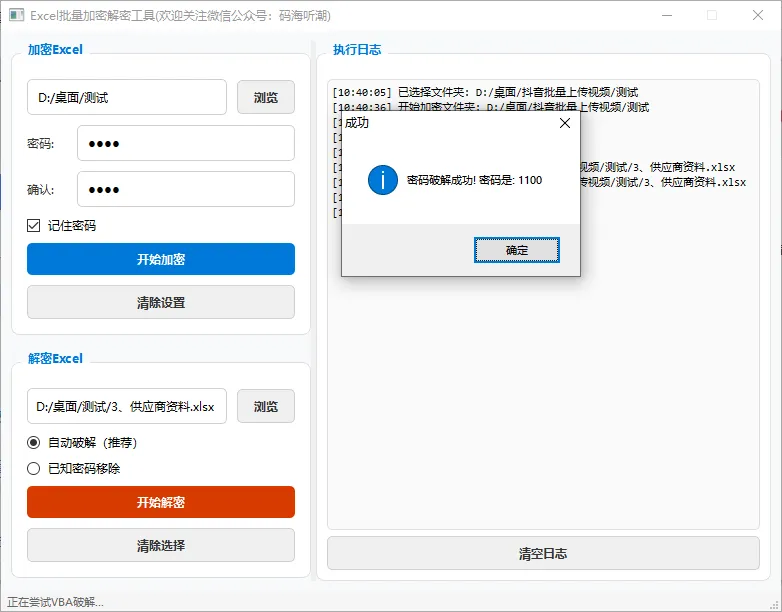
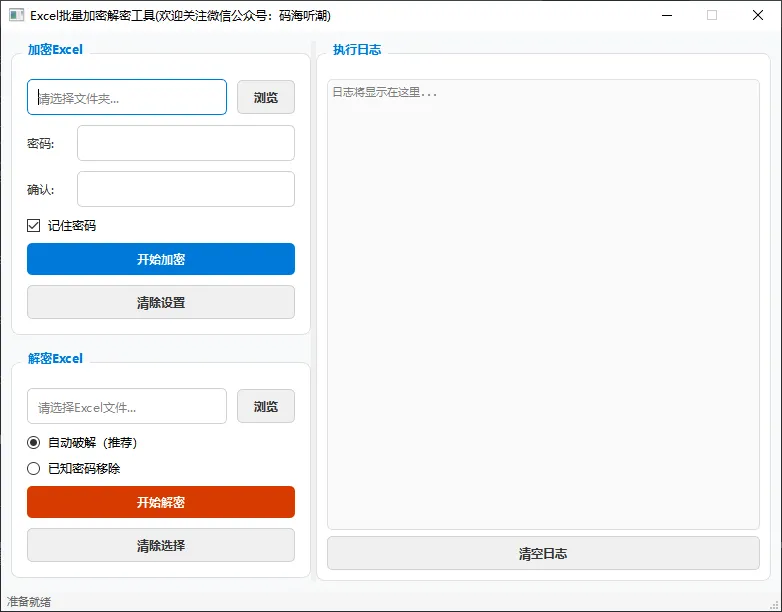
import sysfrom pathlib import Pathfrom PyQt6.QtWidgets import ( QApplication, QMainWindow, QWidget, QVBoxLayout, QHBoxLayout, QLabel, QLineEdit, QPushButton, QFileDialog, QMessageBox, QGroupBox, QRadioButton, QCheckBox, QStatusBar, QButtonGroup, QSplitter, QTextEdit)from PyQt6.QtCore import Qt, QSettingsfrom PyQt6.QtGui import QFont, QTextCursorclass ExcelPasswordTool(QMainWindow): def __init__(self): super().__init__() self.setWindowTitle("Excel批量加密解密工具(欢迎关注微信公众号:码海听潮)") self.setFixedSize(780, 580) # 设置应用样式 self.setup_style() # 主窗口部件 central_widget = QWidget() self.setCentralWidget(central_widget) main_layout = QHBoxLayout(central_widget) main_layout.setSpacing(10) main_layout.setContentsMargins(10, 10, 10, 10) # 创建分割器 splitter = QSplitter(Qt.Orientation.Horizontal) main_layout.addWidget(splitter) # 左侧面板(30%) left_panel = QWidget() left_panel.setMinimumWidth(300) left_layout = QVBoxLayout(left_panel) left_layout.setSpacing(15) left_layout.setContentsMargins(0, 0, 0, 0) # 右侧日志面板(70%) right_panel = QWidget() right_layout = QVBoxLayout(right_panel) right_layout.setContentsMargins(0, 0, 0, 0) # 创建日志文本框 log_group = QGroupBox("执行日志") log_layout = QVBoxLayout(log_group) log_layout.setContentsMargins(10, 15, 10, 10) self.log_text = QTextEdit() self.log_text.setReadOnly(True) self.log_text.setPlaceholderText("日志将显示在这里...") self.log_text.setStyleSheet(""" QTextEdit { font-family: 'Consolas', 'Microsoft YaHei'; font-size: 11px; border: 1px solid #E0E0E0; border-radius: 5px; background-color: #FAFAFA; } """) log_layout.addWidget(self.log_text) # 添加清空日志按钮 clear_log_btn = QPushButton("清空日志") clear_log_btn.setObjectName("secondary") clear_log_btn.clicked.connect(self.clear_log) log_layout.addWidget(clear_log_btn) right_layout.addWidget(log_group) # 将面板添加到分割器 splitter.addWidget(left_panel) splitter.addWidget(right_panel) splitter.setSizes([300, 700]) # 设置加密和解密功能在左侧面板 self.setup_encrypt_section(left_layout) self.setup_decrypt_section(left_layout) # 添加弹性空间 left_layout.addStretch() # 状态栏 self.status_bar = QStatusBar() self.setStatusBar(self.status_bar) self.status_bar.showMessage("准备就绪") self.status_bar.setStyleSheet(""" QStatusBar { background-color: #F5F5F5; padding: 5px; font-size: 11px; color: #666; } """) # 加载设置 self.load_settings() def setup_style(self): """设置应用样式""" self.setStyleSheet(""" QMainWindow { background-color: #F8F9FA; } QLabel { color: #333; } QGroupBox { font-weight: bold; border: 1px solid #E0E0E0; border-radius: 8px; margin-top: 12px; padding-top: 10px; background-color: white; } QGroupBox::title { subcontrol-origin: margin; left: 10px; padding: 0 5px; color: #0078d7; } QLineEdit { border: 1px solid #D0D0D0; border-radius: 5px; padding: 8px; background-color: white; font-size: 12px; } QLineEdit:focus { border-color: #0078d7; outline: none; } QPushButton { border: none; border-radius: 5px; padding: 8px 16px; font-weight: bold; font-size: 12px; } QPushButton#primary { background-color: #0078d7; color: white; } QPushButton#primary:hover { background-color: #005a9e; } QPushButton#primary:pressed { background-color: #004578; } QPushButton#danger { background-color: #d83b01; color: white; } QPushButton#danger:hover { background-color: #b52a00; } QPushButton#secondary { background-color: #f0f0f0; color: #333; border: 1px solid #D0D0D0; } QPushButton#secondary:hover { background-color: #e5e5e5; } QRadioButton { spacing: 8px; font-size: 12px; } QCheckBox { spacing: 8px; font-size: 12px; } """) def setup_encrypt_section(self, parent_layout): """设置加密功能区域""" encrypt_group = QGroupBox("加密Excel") encrypt_layout = QVBoxLayout(encrypt_group) encrypt_layout.setSpacing(10) encrypt_layout.setContentsMargins(15, 15, 15, 15) # 文件夹选择 folder_layout = QHBoxLayout() self.folder_path = QLineEdit() self.folder_path.setPlaceholderText("请选择文件夹...") folder_layout.addWidget(self.folder_path) browse_btn = QPushButton("浏览") browse_btn.setObjectName("secondary") browse_btn.clicked.connect(self.browse_folder) folder_layout.addWidget(browse_btn) encrypt_layout.addLayout(folder_layout) # 密码输入 pwd_layout = QHBoxLayout() pwd_label = QLabel("密码:") pwd_label.setMinimumWidth(40) pwd_layout.addWidget(pwd_label) self.password_entry = QLineEdit() self.password_entry.setEchoMode(QLineEdit.EchoMode.Password) pwd_layout.addWidget(self.password_entry) encrypt_layout.addLayout(pwd_layout) # 确认密码 confirm_layout = QHBoxLayout() confirm_label = QLabel("确认:") confirm_label.setMinimumWidth(40) confirm_layout.addWidget(confirm_label) self.confirm_entry = QLineEdit() self.confirm_entry.setEchoMode(QLineEdit.EchoMode.Password) confirm_layout.addWidget(self.confirm_entry) encrypt_layout.addLayout(confirm_layout) # 记住密码 self.save_password_check = QCheckBox("记住密码") self.save_password_check.toggled.connect(self.toggle_save_password) encrypt_layout.addWidget(self.save_password_check) # 加密按钮 self.encrypt_btn = QPushButton("开始加密") self.encrypt_btn.setObjectName("primary") self.encrypt_btn.clicked.connect(self.protect_files) encrypt_layout.addWidget(self.encrypt_btn) # 清除设置按钮 clear_encrypt_btn = QPushButton("清除设置") clear_encrypt_btn.setObjectName("secondary") clear_encrypt_btn.clicked.connect(self.clear_encrypt_settings) encrypt_layout.addWidget(clear_encrypt_btn) parent_layout.addWidget(encrypt_group) def setup_decrypt_section(self, parent_layout): """设置解密功能区域""" decrypt_group = QGroupBox("解密Excel") decrypt_layout = QVBoxLayout(decrypt_group) decrypt_layout.setSpacing(10) decrypt_layout.setContentsMargins(15, 15, 15, 15) # 文件选择 file_layout = QHBoxLayout() self.file_path = QLineEdit() self.file_path.setPlaceholderText("请选择Excel文件...") file_layout.addWidget(self.file_path) browse_btn = QPushButton("浏览") browse_btn.setObjectName("secondary") browse_btn.clicked.connect(self.browse_file) file_layout.addWidget(browse_btn) decrypt_layout.addLayout(file_layout) # 解密方法 self.method_vba = QRadioButton("自动破解(推荐)") self.method_vba.setChecked(True) self.method_known = QRadioButton("已知密码移除") decrypt_layout.addWidget(self.method_vba) decrypt_layout.addWidget(self.method_known) # 已知密码输入 self.known_pass_frame = QWidget() known_layout = QHBoxLayout(self.known_pass_frame) known_layout.setContentsMargins(20, 0, 0, 0) known_label = QLabel("已知密码:") known_label.setMinimumWidth(70) known_layout.addWidget(known_label) self.known_pass_entry = QLineEdit() self.known_pass_entry.setEchoMode(QLineEdit.EchoMode.Password) known_layout.addWidget(self.known_pass_entry) decrypt_layout.addWidget(self.known_pass_frame) self.known_pass_frame.setVisible(False) # 绑定方法选择事件 self.method_vba.toggled.connect(self.on_method_change) self.method_known.toggled.connect(self.on_method_change) # 解密按钮 self.decrypt_btn = QPushButton("开始解密") self.decrypt_btn.setObjectName("danger") self.decrypt_btn.clicked.connect(self.start_decrypt) decrypt_layout.addWidget(self.decrypt_btn) # 清除选择按钮 clear_decrypt_btn = QPushButton("清除选择") clear_decrypt_btn.setObjectName("secondary") clear_decrypt_btn.clicked.connect(self.clear_decrypt_settings) decrypt_layout.addWidget(clear_decrypt_btn) parent_layout.addWidget(decrypt_group) # ========== 槽函数(空实现) ========== def browse_folder(self): """浏览文件夹""" folder = QFileDialog.getExistingDirectory(self, "选择文件夹") if folder: self.folder_path.setText(folder) self.add_log(f"已选择文件夹: {folder}") def browse_file(self): """浏览文件""" file_path, _ = QFileDialog.getOpenFileName( self, "选择Excel文件", "", "Excel文件 (*.xls *.xlsx)" ) if file_path: self.file_path.setText(file_path) self.add_log(f"已选择文件: {file_path}") def on_method_change(self): """解密方法选择变化""" self.known_pass_frame.setVisible(self.method_known.isChecked()) def protect_files(self): """加密文件(空实现)""" folder_path = self.folder_path.text() password = self.password_entry.text() confirm = self.confirm_entry.text() if not folder_path: QMessageBox.critical(self, "错误", "请选择文件夹路径") return if not password: QMessageBox.critical(self, "错误", "请输入密码") return if password != confirm: QMessageBox.critical(self, "错误", "两次输入的密码不一致") return if not Path(folder_path).exists(): QMessageBox.critical(self, "错误", "指定的文件夹不存在") return self.add_log(f"开始加密文件夹: {folder_path}") # 此处可添加加密逻辑 def start_decrypt(self): """开始解密(空实现)""" file_path = self.file_path.text() if not file_path: QMessageBox.critical(self, "错误", "请选择Excel文件") return if not Path(file_path).exists(): QMessageBox.critical(self, "错误", "指定的文件不存在") return method = self.method_vba.isChecked() if not method: password = self.known_pass_entry.text() if not password: QMessageBox.critical(self, "错误", "请输入已知密码") return method_name = "VBA自动破解" if method else "已知密码移除" self.add_log(f"开始解密文件: {file_path}") self.add_log(f"解密方法: {method_name}") # 此处可添加解密逻辑 def add_log(self, message): """添加日志到日志文本框""" from datetime import datetime timestamp = datetime.now().strftime("%H:%M:%S") formatted_message = f"[{timestamp}] {message}" self.log_text.append(formatted_message) cursor = self.log_text.textCursor() cursor.movePosition(QTextCursor.MoveOperation.End) self.log_text.setTextCursor(cursor) def clear_log(self): """清空日志""" self.log_text.clear() self.add_log("日志已清空") def save_settings(self, password): """保存设置""" settings = QSettings("ExcelTool", "Settings") settings.setValue("folder_path", self.folder_path.text()) settings.setValue("password", password) settings.setValue("save_password", self.save_password_check.isChecked()) def load_settings(self): """加载设置""" settings = QSettings("ExcelTool", "Settings") folder_path = settings.value("folder_path", "") save_password = settings.value("save_password", False, type=bool) if folder_path: self.folder_path.setText(folder_path) if save_password: password = settings.value("password", "") if password: self.password_entry.setText(password) self.confirm_entry.setText(password) self.save_password_check.setChecked(True) def clear_saved_password(self): """清除保存的密码""" settings = QSettings("ExcelTool", "Settings") settings.setValue("password", "") settings.setValue("save_password", False) def toggle_save_password(self, checked): """切换是否保存密码""" if not checked: self.clear_saved_password() def clear_encrypt_settings(self): """清除加密设置""" self.folder_path.clear() self.password_entry.clear() self.confirm_entry.clear() self.save_password_check.setChecked(False) self.status_bar.showMessage("加密设置已清除") self.add_log("加密设置已清除") def clear_decrypt_settings(self): """清除解密设置""" self.file_path.clear() self.known_pass_entry.clear() self.method_vba.setChecked(True) self.status_bar.showMessage("解密设置已清除") self.add_log("解密设置已清除")def main(): app = QApplication(sys.argv) font = QFont("Microsoft YaHei", 9) app.setFont(font) window = ExcelPasswordTool() window.show() sys.exit(app.exec())if __name__ == "__main__": main()