【Excel VBA 编程】高级制表——多层环形图
- 2026-09-15 01:40:59
【Excel VBA 编程】高级制表——多层环形图“如何将标准的环形图转换成一个由15个圆环堆叠而成的复杂图表” 本期咱们继续制图,回到Excel本职工作中...... 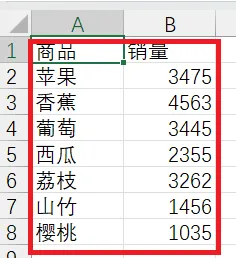
好了,今天的内容到此结束了,下期继续
总是听到或看到有人问,编程好学吗?如何入门?多久能学会?它能做些什么?怎么写代码呀?执行过程中出问题了谁能帮帮我...如果你也有类似的问题那就赶快关注我的公众号,一起学起来吧!

效果展示
如下工作表中统计出来的数据
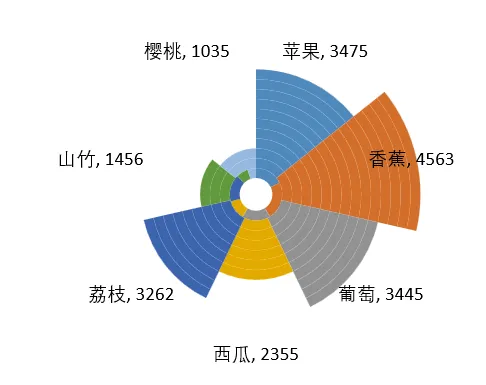
一键自动生成的多层环形图显示如下:
与传统的圆环图表相比,它提供了更丰富的视觉层次和更直观的数据表达,有需要的小伙伴参考如下代码制作起来吧

代码及实现步骤
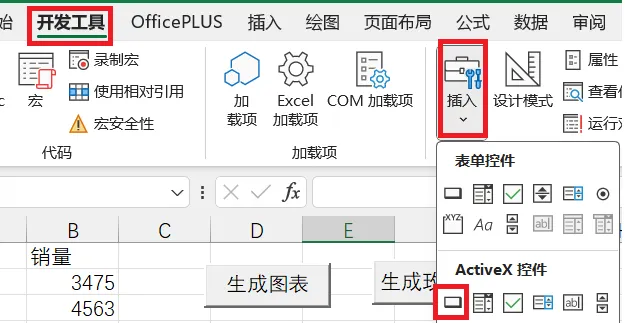
工作表中,通过工具栏上的【开发工具】【插入】,增加ActiveX控件中的命令按钮,如“生成图表”
双击“生成图表”按钮,添加代码,代码参考:
Private Sub CommandButton1_Click()Dim i, j, FDim p, pmaxDim ws As WorksheetDim chartObj As ChartObjectDim mychart As Chart' 初始化设置Set ws = ActiveSheet '当前工作表Set dataRange = ws.Range("A1").CurrentRegion ' A列为分类标签,B列为数值Set chartObj = ws.ChartObjects.Add(Left:=100, Width:=375, Top:=75, Height:=225)Set mychart = chartObj.Chartmychart.chartType = xlDoughnutmychart.SetSourceData Source:=dataRangemychart.ChartGroups(1).DoughnutHoleSize = 10With mychart.FullSeriesCollection(1).ApplyDataLabels.DataLabels.ShowPercentage = True.Format.Line.Weight = 0F = "={1"For i = 2 To .DataLabels.CountF = F & ",1"NextF = F & "}"For i = 2 To 15mychart.SeriesCollection.NewSeriesmychart.FullSeriesCollection(i).Values = FNext iFor i = 1 To .DataLabels.Countp = Val(.DataLabels(i).Text)If pmax < p Then pmax = pNext iFor i = 1 To .DataLabels.Countp = Val(.DataLabels(i).Text)For j = 1 To 15mychart.FullSeriesCollection(i).Format.Line.Weight = 0mychart.SeriesCollection(j).Points(i).SelectIf j > p * 15 / pmax Thenmychart.SeriesCollection(j).Points(i).Format.Fill.Visible = msoFalseEnd IfNext jNext i'设置数据标签.DataLabels.ShowValue = True.DataLabels.ShowPercentage = False.DataLabels.ShowCategoryName = TrueActiveChart.SeriesCollection(15).ApplyDataLabelsFor i = 1 To .DataLabels.Countmychart.SeriesCollection(15).DataLabels(i).Text = .DataLabels(i).TextNext i.DataLabels.Deletemychart.Legend.DeleteEnd WithEnd Sub
初始化与基础图表设置,即圆环图
构建虚拟数据数组并创建堆叠系列,此处设置的是15层
按比例控制填充可见性
显示数据标签
公众号同时也在不间断地分享免费的编程案例,如果想学习更多的编程知识,无论是用来提升自动化办公效率还是想提升自我,都可以关注我的公众号,解锁更多的VBA技能
本文来自网友投稿或网络内容,如有侵犯您的权益请联系我们删除,联系邮箱:wyl860211@qq.com 。

