【Excel VBA 编程】关键字+超链接,快速定位近期修改的文件
- 2026-09-26 20:13:19
【Excel VBA 编程】关键字+超链接,快速定位近期修改的文件“自动化实现:按关键字获取最近三天修改的文档列表并生成超链接” 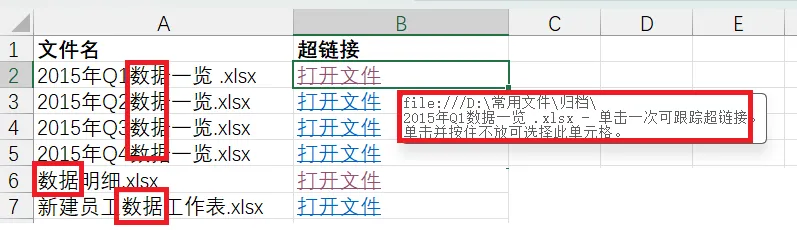
参考代码: 主程序入口,即可执行代码 子过程:递归遍历文件夹过程 以上代码已经精简过了,只保留了主要功能,大家可以根据需要优化代码:如增加易用性方面的功能,如工作表中历史数据清理、显示格式、关键字输入框设计等等;另外还可以考虑将获取到的文件保存到数组或是字典中,然后一次写入到工作表...... 好了,今天的内容到此结束了,下期继续
总是听到或看到有人问,编程好学吗?如何入门?多久能学会?它能做些什么?怎么写代码呀?执行过程中出问题了谁能帮帮我...如果你也有类似的问题那就赶快关注我的公众号,一起学起来吧!
在日常工作中,我们常常需要追踪和管理大量文件,特别是那些近期更新过的文档,手动查找不仅效率低下,还容易遗漏
此时,我们就可以通过VBA编程实现一个自动、可视化的解决办法

需求描述
根据关键字,一键获取指定文件夹中最近三天内修改过的所有Excel文件列表,并直接生成可点击的超链接,实现文件的快速定位与打开
例如,想要获取“D:\常用文件\归档”目录及其子目录下文档,文档要求如下:
该文档必须是xlsx或xls格式的
该文档名中要有“数据”这个关键字
该文档必须是3天内修改过的
最终输出结果呈现形式要求输出到工作表中,A列是具体的文件名,B列直接生成可点击的超链接,能够快速定位或打开文档,如下图所示

效果展示
已关注
关注
重播 分享 赞

实现步骤
该功能的核心在于结合文件系统遍历与超链接创建。主要分为两个步骤:
使用递归遍历指定文件夹,筛选出所有符合条件的Excel文件
将符合条件的文件信息(文件名、超链接)写入Excel工作表
Dim i As Integer '全局变量,用于定位工作表中位置Sub FindAndGetFiles()Dim folderPath As String, keyWords As StringWith Application.FileDialog(msoFileDialogFolderPicker)If .Show Then folderPath = .SelectedItems(1) Else Exit SubEnd WithfolderPath = folderPath & IIf(Right(folderPath, 1) = "\", "", "\")keyWords = InputBox("请输入关键字:", "关键字输入") 'If keyWords = "" ThenMsgBox "未输入关键词,程序退出!"Exit SubEnd IfCall TraverseFolder(folderPath, keyWords)MsgBox "完成!", vbInformationEnd Sub
Sub TraverseFolder(folderPath As String, searchKey As String)Dim fso As Object, folder As Object, subFolder As Object, file As ObjectSet fso = CreateObject("Scripting.FileSystemObject")Set folder = fso.GetFolder(folderPath)' 遍历当前文件夹文件For Each file In folder.Files' 检查文件名是否包含关键字(不区分大小写)If InStr(1, file.Name, searchKey, vbTextCompare) > 0 Then' Excel文档并且是最近三天修改过的If (Right(file.Name, 4) = "xlsx" Or Right(file.Name, 3) = "xls") And (Now - file.DateLastModified <= 3) Then' 当前活动工作表(ActiveSheet)中插入超链接:A列文件名,B列超链接Range("A2").Offset(i, 0).Value = file.NameActiveSheet.Hyperlinks.Add Anchor:=Range("B2").Offset(i, 0), _Address:=file.path, _TextToDisplay:="打开文件"i = i + 1End IfEnd IfNext file' 递归遍历子文件夹For Each subFolder In folder.SubFoldersTraverseFolder subFolder.path, searchKeyNext subFolder' 释放对象Set file = NothingSet subFolder = NothingSet folder = NothingSet fso = NothingEnd Sub
公众号同时也在不间断地分享免费的编程案例,如果想学习更多的编程知识,无论是用来提升自动化办公效率还是想提升自我,都可以关注我的公众号,解锁更多的VBA技能
本文来自网友投稿或网络内容,如有侵犯您的权益请联系我们删除,联系邮箱:wyl860211@qq.com 。

