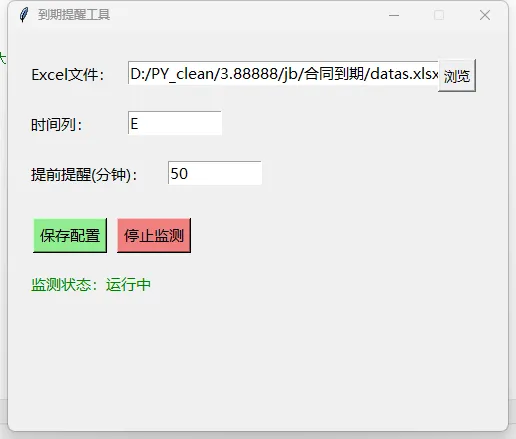
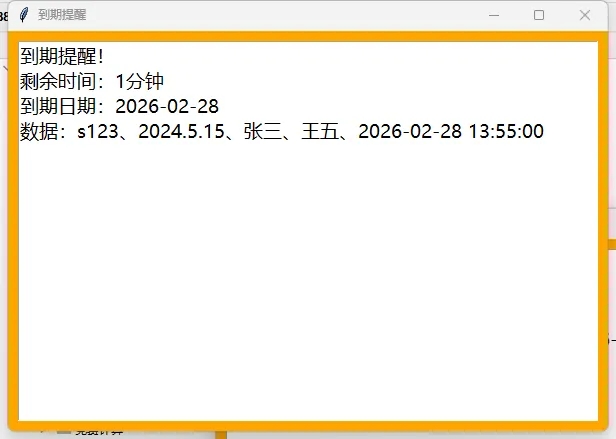
# coding=utf-8import osimport randomimport threadingimport timeimport configparserimport tkinter.messageboximport datetimefrom tkinter import *from tkinter import filedialogfrom openpyxl import load_workbook# 全局变量config = configparser.ConfigParser()CONFIG_FILE = 'reminder_config.ini'excel_path = ''time_column = 'F'remind_minutes = 60running = Falsemonitor_thread = Nonedef load_config(): """加载配置""" global excel_path, time_column, remind_minutes if os.path.exists(CONFIG_FILE): config.read(CONFIG_FILE, encoding='utf-8') excel_path = config.get('SETTINGS', 'excel_path', fallback='') time_column = config.get('SETTINGS', 'time_column', fallback='F') remind_minutes = config.getint('SETTINGS', 'remind_minutes', fallback=60)def save_config(): """保存配置""" config['SETTINGS'] = { 'excel_path': excel_path, 'time_column': time_column, 'remind_minutes': str(remind_minutes) # 确保保存为字符串 } with open(CONFIG_FILE, 'w', encoding='utf-8') as f: config.write(f)def select_excel_path(): """选择Excel文件""" global excel_path file_path = filedialog.askopenfilename( title='选择Excel文件', filetypes=[('Excel文件', '*.xlsx'), ('所有文件', '*.*')] ) if file_path: excel_path = file_path path_entry.delete(0, END) path_entry.insert(0, excel_path) save_config() # 自动保存配置def update_config(): """更新配置""" global time_column, remind_minutes col_input = col_entry.get().strip().upper() if not col_input or not col_input.isalpha(): tkinter.messagebox.showwarning('警告', '时间列必须是字母!') return try: minutes = int(minute_entry.get().strip()) if minutes < 1: raise ValueError except ValueError: tkinter.messagebox.showwarning('警告', '提醒时间必须是大于0的整数!') return time_column = col_input remind_minutes = minutes save_config() tkinter.messagebox.showinfo('成功', '配置已保存!')def col_letter_to_index(col_letter): """列字母转数字索引""" col_letter = col_letter.upper() if len(col_letter) == 1 and col_letter.isalpha(): return ord(col_letter) - ord('A') + 1 return 6 # 默认F列def parse_date(date_str): """解析日期字符串""" for fmt in ['%Y-%m-%d %H:%M:%S', '%Y.%m.%d %H:%M:%S', '%Y-%m-%d %H:%M:%S', '%Y/%m/%d %H:%M:%S']: try: return datetime.datetime.strptime(str(date_str).strip(), fmt) except ValueError: continue return Nonedef check_reminder(): """检查提醒""" if not excel_path or not os.path.exists(excel_path): return try: wb = load_workbook(excel_path, data_only=True)#读取excel ws = wb.active col_idx = col_letter_to_index(time_column)#把输入的列号转换为数字(第几列) remind_seconds = remind_minutes * 60 now = datetime.datetime.now() for row in range(2, ws.max_row + 1): try: cell_value = ws.cell(row=row, column=col_idx).value#读取设置列的内容 if not cell_value: continue end_date = parse_date(cell_value)#解析时间 if not end_date: continue remaining = (end_date - now).total_seconds()#时间的加减(计算时间间隔) print(remaining) if remaining <= remind_seconds: # 获取行数据 row_data = [] for col in range(1, ws.max_column + 1): val = ws.cell(row=row, column=col).value row_data.append(str(val) if val else "") # 显示提醒 minutes_left = int(remaining / 60) msg = f'到期提醒!\n剩余时间:{minutes_left}分钟\n到期日期:{end_date.strftime("%Y-%m-%d")}\n数据:{"、".join(row_data)}' threading.Thread(target=show_popup, args=(msg,), daemon=True).start()#多线程,其实没必要。 except Exception as e: print(f"行{row}处理错误:{e}") except Exception as e: print(f"Excel读取错误:{e}")def show_popup(message): """显示弹窗""" time.sleep(random.randint(1, 3)) win = Toplevel(bg='orange') win.title('到期提醒') win.geometry('600x400') win.attributes('-topmost', True) # 消息文本框 text_box = Text(win, font=('微软雅黑', 14), wrap=WORD) text_box.pack(fill=BOTH, expand=True, padx=10, pady=10) text_box.insert('1.0', message) text_box.config(state=DISABLED) # 关闭按钮 Button(win, text='关闭', bg='lightblue', font=('微软雅黑', 14), command=win.destroy).pack(pady=10)def monitor_loop(): """监测循环""" while running: check_reminder() time.sleep(20) # 不断循环,每20秒检查一次def toggle_monitor(): """启动/停止监测""" global running, monitor_thread if not excel_path or not os.path.exists(excel_path): tkinter.messagebox.showwarning('警告', '请先选择有效的Excel文件!') return if not running: running = True monitor_btn.config(text='停止监测', bg='lightcoral') monitor_thread = threading.Thread(target=monitor_loop, daemon=True) monitor_thread.start() status_label.config(text='监测状态:运行中', fg='green') else: running = False monitor_btn.config(text='启动监测', bg='lightblue') status_label.config(text='监测状态:已停止', fg='red')def auto_start_monitor(): """自动启动监测""" if excel_path and os.path.exists(excel_path): toggle_monitor()# 创建主界面root = Tk()root.title('到期提醒工具')root.geometry('500x400')root.resizable(False, False)# 加载配置load_config()# Excel路径Label(root, text='Excel文件:', font=('微软雅黑', 11)).place(x=20, y=30)path_entry = Entry(root, width=35, font=('微软雅黑', 11))path_entry.place(x=120, y=30)path_entry.insert(0, excel_path)Button(root, text='浏览', font=('微软雅黑', 10), command=select_excel_path).place(x=430, y=28)# 时间列Label(root, text='时间列:', font=('微软雅黑', 11)).place(x=20, y=80)col_entry = Entry(root, width=10, font=('微软雅黑', 11))col_entry.place(x=120, y=80)col_entry.insert(0, time_column)# 提醒时间Label(root, text='提前提醒(分钟):', font=('微软雅黑', 11)).place(x=20, y=130)minute_entry = Entry(root, width=10, font=('微软雅黑', 11))minute_entry.place(x=160, y=130)minute_entry.insert(0, str(remind_minutes))# 按钮框架frame = Frame(root)frame.place(x=20, y=180, width=460, height=50)Button(frame, text='保存配置', bg='lightgreen', font=('微软雅黑', 11), command=update_config).pack(side=LEFT, padx=5)monitor_btn = Button(frame, text='启动监测', bg='lightblue', font=('微软雅黑', 11), command=toggle_monitor)monitor_btn.pack(side=LEFT, padx=5)# 状态显示status_label = Label(root, text='监测状态:已停止', fg='red', font=('微软雅黑', 11))status_label.place(x=20, y=240)# 自动启动监测root.after(500, auto_start_monitor) root.mainloop()
 10个月宝宝每天需要喝多少奶粉?

