告别手动复制粘贴!一键将Word所有表格导入Excel的VBA秘籍
- 2026-09-14 23:55:43
告别手动复制粘贴!一键将Word所有表格导入Excel的VBA秘籍读者留言: 一个WORD文件中有多个表格(例如:简历,格式都一样),需将WORD文件中有多个表格合并到一个Excel文件中,一行是一个WORD文件中的表格内容。 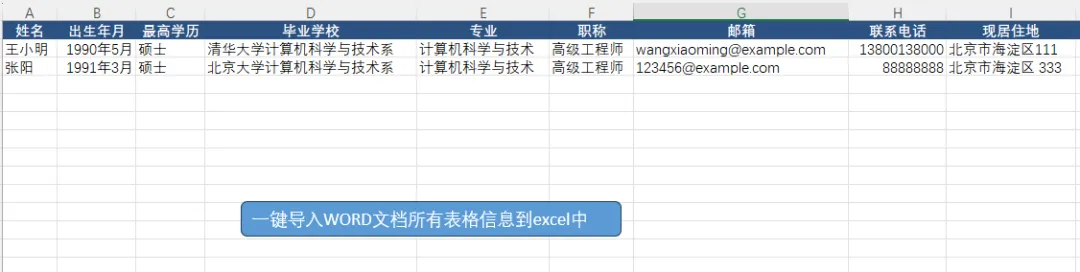
经过测试以下代码可以实现,欢迎测试使用。 关注公众号后回复 「20260203」 获取下载链接!
Sub ExtractMultipleResumesFromWord()Dim wdApp As Object, wdDoc As ObjectDim ws As WorksheetDim tableIndex As Long, rowNum As Long, i As LongDim lastRow As LongDim fileName As StringDim tableCount As Long, validTableCount As LongOn Error GoTo ErrorHandler' 设置Excel工作表Set ws = ThisWorkbook.Sheets(1)ws.Cells.ClearrowNum = 2 ' 从第2行开始写入数据(第1行为标题行)' 创建Word应用程序对象Set wdApp = CreateObject("Word.Application")wdApp.Visible = False ' 设置为不可见以提高处理速度' 获取Word文件fileName = Application.GetOpenFilename("Word文件 (*.doc;*.docx), *.doc;*.docx", , "选择包含多个简历的Word文件")If fileName = "False" Then Exit Sub ' 用户取消了选择' 打开Word文档Set wdDoc = wdApp.Documents.Open(fileName)' 检查文档中表格数量tableCount = wdDoc.Tables.CountIf tableCount = 0 ThenMsgBox "文档中没有找到表格!", vbExclamationGoTo CleanUpEnd If' 设置Excel标题行SetExcelHeaders ws' 遍历所有表格For tableIndex = 1 To tableCountDim currentTable As ObjectSet currentTable = wdDoc.Tables(tableIndex)' 检查表格是否可能是简历表格(至少有5行2列)If currentTable.Rows.Count >= 5 And currentTable.Columns.Count >= 2 Then' 提取当前表格中的简历信息If ExtractResumeFromTable(currentTable, ws, rowNum) ThenvalidTableCount = validTableCount + 1rowNum = rowNum + 1End IfEnd IfNext tableIndex' 自动调整列宽ws.Columns("A:Z").AutoFitMsgBox "完成!共找到 " & tableCount & " 个表格,成功提取 " & validTableCount & " 份简历。", vbInformationCleanUp:' 清理对象If Not wdDoc Is Nothing ThenwdDoc.Close FalseSet wdDoc = NothingEnd IfIf Not wdApp Is Nothing ThenwdApp.QuitSet wdApp = NothingEnd IfExit SubErrorHandler:MsgBox "发生错误: " & Err.Description, vbCriticalGoTo CleanUpEnd Sub' 设置Excel标题行Sub SetExcelHeaders(ws As Worksheet)With ws.Cells(1, 1) = "姓名".Cells(1, 2) = "出生年月".Cells(1, 3) = "最高学历".Cells(1, 4) = "毕业学校".Cells(1, 5) = "专业".Cells(1, 6) = "职称".Cells(1, 7) = "邮箱".Cells(1, 8) = "联系电话".Cells(1, 9) = "现居住地".Cells(1, 10) = "性别".Cells(1, 11) = "年龄".Cells(1, 12) = "工作年限".Cells(1, 13) = "期望职位".Cells(1, 14) = "期望薪资".Cells(1, 15) = "籍贯"' 设置标题行格式With .Rows(1).Font.Bold = True.Font.Color = RGB(255, 255, 255).Interior.Color = RGB(44, 82, 130).HorizontalAlignment = xlCenterEnd WithEnd WithEnd Sub' 从单个表格中提取简历信息Function ExtractResumeFromTable(tbl As Object, ws As Worksheet, rowNum As Long) As BooleanOn Error GoTo ExtractErrorDim fieldDict As ObjectSet fieldDict = CreateObject("Scripting.Dictionary")' 初始化字典,用于存储字段名和值fieldDict.Add "姓名", ""fieldDict.Add "出生年月", ""fieldDict.Add "最高学历", ""fieldDict.Add "毕业学校", ""fieldDict.Add "专业", ""fieldDict.Add "职称", ""fieldDict.Add "邮箱", ""fieldDict.Add "联系电话", ""fieldDict.Add "现居住地", ""fieldDict.Add "性别", ""fieldDict.Add "年龄", ""fieldDict.Add "工作年限", ""fieldDict.Add "期望职位", ""fieldDict.Add "期望薪资", ""fieldDict.Add "籍贯", ""' 遍历表格行,提取字段信息Dim i As Long, j As LongFor i = 1 To tbl.Rows.CountIf tbl.Columns.Count >= 2 ThenDim fieldName As String, fieldValue As String' 获取第一列的字段名fieldName = CleanText(tbl.Cell(i, 1).Range.Text)fieldName = Replace(fieldName, ":", "") ' 去除冒号fieldName = Replace(fieldName, ":", "") ' 去除中文冒号fieldName = Trim(fieldName)' 获取第二列的字段值If tbl.Columns.Count >= 2 ThenfieldValue = CleanText(tbl.Cell(i, 2).Range.Text)fieldValue = Trim(fieldValue)End If' 根据字段名将值存入字典If fieldDict.Exists(fieldName) ThenfieldDict(fieldName) = fieldValueElse' 尝试匹配部分字段名MatchPartialFieldName fieldDict, fieldName, fieldValueEnd IfEnd IfNext i' 将提取的信息写入ExcelWith ws.Cells(rowNum, 1) = fieldDict("姓名").Cells(rowNum, 2) = fieldDict("出生年月").Cells(rowNum, 3) = fieldDict("最高学历").Cells(rowNum, 4) = fieldDict("毕业学校").Cells(rowNum, 5) = fieldDict("专业").Cells(rowNum, 6) = fieldDict("职称").Cells(rowNum, 7) = fieldDict("邮箱").Cells(rowNum, 8) = fieldDict("联系电话").Cells(rowNum, 9) = fieldDict("现居住地").Cells(rowNum, 10) = fieldDict("性别").Cells(rowNum, 11) = fieldDict("年龄").Cells(rowNum, 12) = fieldDict("工作年限").Cells(rowNum, 13) = fieldDict("期望职位").Cells(rowNum, 14) = fieldDict("期望薪资").Cells(rowNum, 15) = fieldDict("籍贯")End WithExtractResumeFromTable = TrueExit FunctionExtractError:ExtractResumeFromTable = FalseExit FunctionEnd Function' 清理文本中的特殊字符Function CleanText(text As String) As StringDim result As Stringresult = text' 去除Word表格单元格末尾的特殊字符result = Replace(result, Chr(13), "") ' 回车符result = Replace(result, Chr(7), "") ' 特殊字符result = Replace(result, Chr(10), "") ' 换行符result = Replace(result, vbNewLine, "") ' 换行result = Replace(result, vbCrLf, "") ' 回车换行result = Replace(result, vbTab, "") ' 制表符' 去除首尾空格result = Trim(result)' 如果有多个连续空格,替换为单个空格While InStr(result, " ") > 0result = Replace(result, " ", " ")WendCleanText = resultEnd Function' 匹配部分字段名(处理字段名略有差异的情况)Sub MatchPartialFieldName(dict As Object, fieldName As String, fieldValue As String)Dim key As Variant' 定义字段名可能的变体For Each key In dict.KeysSelect Case keyCase "姓名"If InStr(fieldName, "姓") > 0 And InStr(fieldName, "名") > 0 Thendict(key) = fieldValueExit SubEnd IfCase "出生年月"If InStr(fieldName, "出生") > 0 Or InStr(fieldName, "生日") > 0 Thendict(key) = fieldValueExit SubEnd IfCase "最高学历"If InStr(fieldName, "学历") > 0 Or InStr(fieldName, "学位") > 0 Thendict(key) = fieldValueExit SubEnd IfCase "毕业学校"If InStr(fieldName, "学校") > 0 Or InStr(fieldName, "院校") > 0 Or InStr(fieldName, "毕业") > 0 Thendict(key) = fieldValueExit SubEnd IfCase "专业"If fieldName = "专业" Or fieldName = "所学专业" Thendict(key) = fieldValueExit SubEnd IfCase "职称"If fieldName = "职称" Or fieldName = "职位" Or fieldName = "职务" Thendict(key) = fieldValueExit SubEnd IfCase "邮箱"If InStr(fieldName, "邮箱") > 0 Or InStr(fieldName, "邮件") > 0 Or InStr(fieldName, "E-mail") > 0 Thendict(key) = fieldValueExit SubEnd IfCase "联系电话"If InStr(fieldName, "电话") > 0 Or InStr(fieldName, "手机") > 0 Or InStr(fieldName, "联系") > 0 Thendict(key) = fieldValueExit SubEnd IfCase "现居住地"If InStr(fieldName, "居住") > 0 Or InStr(fieldName, "地址") > 0 Or InStr(fieldName, "住址") > 0 Thendict(key) = fieldValueExit SubEnd IfCase "性别"If fieldName = "性别" Thendict(key) = fieldValueExit SubEnd IfCase "年龄"If fieldName = "年龄" Thendict(key) = fieldValueExit SubEnd IfCase "工作年限"If InStr(fieldName, "工作年限") > 0 Or InStr(fieldName, "经验") > 0 Thendict(key) = fieldValueExit SubEnd IfCase "期望职位"If InStr(fieldName, "期望") > 0 And InStr(fieldName, "职位") > 0 Thendict(key) = fieldValueExit SubEnd IfCase "期望薪资"If InStr(fieldName, "期望") > 0 And InStr(fieldName, "薪资") > 0 Thendict(key) = fieldValueExit SubEnd IfCase "籍贯"If fieldName = "籍贯" Or fieldName = "户口" Or fieldName = "户籍" Thendict(key) = fieldValueExit SubEnd IfEnd SelectNext keyEnd Sub' 批量处理多个Word文件Sub BatchProcessWordFiles()Dim wdApp As Object, wdDoc As ObjectDim ws As WorksheetDim filePath As String, fileName As StringDim tableIndex As Long, rowNum As LongDim fileCount As Long, totalResumeCount As LongDim fso As Object, folder As Object, file As ObjectOn Error GoTo ErrorHandler' 设置Excel工作表Set ws = ThisWorkbook.Sheets(1)ws.Cells.ClearrowNum = 2 ' 从第2行开始写入数据' 创建Word应用程序对象Set wdApp = CreateObject("Word.Application")wdApp.Visible = False' 获取文件夹路径Dim folderPath As StringWith Application.FileDialog(msoFileDialogFolderPicker).Title = "选择包含Word文件的文件夹"If .Show <> -1 Then Exit SubfolderPath = .SelectedItems(1)End With' 创建文件系统对象Set fso = CreateObject("Scripting.FileSystemObject")Set folder = fso.GetFolder(folderPath)' 设置Excel标题行SetExcelHeaders ws' 遍历文件夹中的所有Word文件For Each file In folder.FilesfileName = file.NamefilePath = file.Path' 检查文件扩展名If LCase(Right(fileName, 4)) = ".doc" Or LCase(Right(fileName, 5)) = ".docx" ThenfileCount = fileCount + 1' 打开Word文档Set wdDoc = wdApp.Documents.Open(filePath)' 遍历文档中的所有表格For tableIndex = 1 To wdDoc.Tables.CountDim currentTable As ObjectSet currentTable = wdDoc.Tables(tableIndex)' 检查表格是否可能是简历表格If currentTable.Rows.Count >= 5 And currentTable.Columns.Count >= 2 Then' 提取当前表格中的简历信息If ExtractResumeFromTable(currentTable, ws, rowNum) Then' 在Excel中添加文件名作为参考ws.Cells(rowNum, 16) = fileNamews.Cells(rowNum, 17) = "表格" & tableIndextotalResumeCount = totalResumeCount + 1rowNum = rowNum + 1End IfEnd IfNext tableIndex' 关闭文档wdDoc.Close FalseEnd IfNext file' 自动调整列宽ws.Columns("A:Q").AutoFitMsgBox "完成!共处理 " & fileCount & " 个Word文件,提取 " & totalResumeCount & " 份简历。", vbInformationCleanUp:' 清理对象If Not wdApp Is Nothing ThenwdApp.QuitSet wdApp = NothingEnd IfExit SubErrorHandler:MsgBox "发生错误: " & Err.Description, vbCriticalGoTo CleanUpEnd Sub' 创建简易用户界面Sub ShowResumeExtractorUI()Dim response As Integerresponse = MsgBox("请选择操作方式:" & vbCrLf & vbCrLf & _"是(Y) - 处理单个Word文件(文件中有多份简历)" & vbCrLf & _"否(N) - 批量处理文件夹中的多个Word文件" & vbCrLf & _"取消 - 退出", vbYesNoCancel + vbQuestion, "简历提取工具")Select Case responseCase vbYesExtractMultipleResumesFromWordCase vbNoBatchProcessWordFilesCase vbCancel' 用户取消,不做任何操作End SelectEnd Sub
示例文件下载
本文来自网友投稿或网络内容,如有侵犯您的权益请联系我们删除,联系邮箱:wyl860211@qq.com 。

