上传 Excel 文件进行数据库比对--增加导出功能
- 2026-09-19 13:51:54
上传 Excel 文件进行数据库比对--增加导出功能
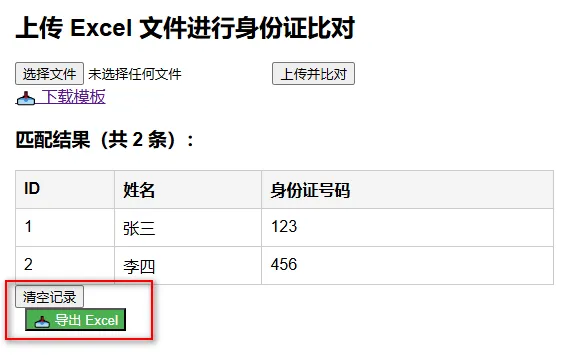
一、确认pom.xml中存在poi依赖
<dependency><groupId>org.apache.poi</groupId><artifactId>poi</artifactId><version>5.2.5</version></dependency><dependency><groupId>org.apache.poi</groupId><artifactId>poi-ooxml</artifactId><version>5.2.5</version></dependency>二、在FileController中增加导出方法
@GetMapping("/export-results")public ResponseEntity<byte[]> exportResultsToExcel(HttpSession session) {try {// ✅ 改为 UserInfo@SuppressWarnings("unchecked") List<UserInfo> results = (List<UserInfo>) session.getAttribute("matchResults");if (results == null || results.isEmpty()) {return ResponseEntity.notFound().build(); } Workbook workbook = new XSSFWorkbook(); Sheet sheet = workbook.createSheet("身份证比对结果"); Row header = sheet.createRow(0); header.createCell(0).setCellValue("ID"); header.createCell(1).setCellValue("姓名"); header.createCell(2).setCellValue("身份证号码");for (int i = 0; i < results.size(); i++) { UserInfo user = results.get(i); // ← 这里是 UserInfo Row row = sheet.createRow(i + 1); row.createCell(0).setCellValue(user.getId() != null ? user.getId() : 0L); row.createCell(1).setCellValue(user.getName() != null ? user.getName() : ""); row.createCell(2).setCellValue(user.getIdCard() != null ? user.getIdCard() : ""); } sheet.autoSizeColumn(0); sheet.autoSizeColumn(1); sheet.autoSizeColumn(2); ByteArrayOutputStream out = new ByteArrayOutputStream(); workbook.write(out); workbook.close(); String timestamp = java.time.LocalDateTime.now() .format(java.time.format.DateTimeFormatter.ofPattern("yyyyMMdd_HHmmss")); String filename = "身份证比对结果_" + timestamp + ".xlsx"; String encodedFilename = java.net.URLEncoder.encode(filename, "UTF-8") .replaceAll("\\+", "%20");return ResponseEntity.ok() .header(org.springframework.http.HttpHeaders.CONTENT_DISPOSITION,"attachment; filename=\"" + encodedFilename + "\"; filename*=UTF-8''" + encodedFilename) .header(org.springframework.http.HttpHeaders.CONTENT_TYPE,"application/vnd.openxmlformats-officedocument.spreadsheetml.sheet") .body(out.toByteArray()); } catch (Exception e) { e.printStackTrace();return ResponseEntity.status(HttpStatus.INTERNAL_SERVER_ERROR).build(); }}三、在你原来的 /upload POST 处理方法中,将 results 存入 session
@PostMapping("/upload")public String handleUpload(@RequestParam("file") MultipartFile file, Model model, HttpSession session) { // <-- 添加 HttpSession 参数// 清除之前的结果(可选,但推荐) session.removeAttribute("matchResults");if (file.isEmpty()) { model.addAttribute("error", "请选择一个 Excel 文件");return"upload"; }try { List<UserInfo> matchedUsers = excelService.processExcel(file);// ✅ 将结果保存到 session,供导出使用 session.setAttribute("matchResults", matchedUsers); model.addAttribute("results", matchedUsers); model.addAttribute("count", matchedUsers.size()); } catch (IOException e) { model.addAttribute("error", "文件读取失败:" + e.getMessage()); } catch (IllegalArgumentException e) { model.addAttribute("error", "Excel 格式错误:" + e.getMessage()); }return"upload"; }四、清除 session
@GetMapping("/clear")public String clearSession(HttpSession session) { session.removeAttribute("matchResults");return"redirect:/upload";}五、在 HTML 页面添加“导出 Excel”按钮,清空按钮方法修改为/clear
<!-- 清空按钮 --><divclass="actions"><buttontype="button"onclick="window.location.href='/clear'">清空记录</button></div><!-- 导出按钮 --><buttontype="button"onclick="window.location.href='/export-results'"style="margin-left: 10px; background-color: #4CAF50; color: white;"> 📥 导出 Excel</button>
本文来自网友投稿或网络内容,如有侵犯您的权益请联系我们删除,联系邮箱:wyl860211@qq.com 。

