当前位置:首页>Excel>第282讲:个税累计预扣自动计算(Excel版工资条一体化)

第282讲:个税累计预扣自动计算(Excel版工资条一体化)

  • 2026-07-05 21:59:49
第282讲:个税累计预扣自动计算(Excel版工资条一体化)

每次发薪前,薪酬HR最头疼的除了社保公积金,就是个人所得税的累计预扣计算了。

“为什么这个月个税突然多了几百块?”

“明明工资没涨,个税怎么涨了?”

“累计预扣到底怎么累计的?”

这些问题几乎每个月都会出现。2019年新个税法实施后,个税计算从按月独立计算改为全年累计预扣,虽然更公平了,但计算复杂度直线上升。

手动计算?一个1000人的公司,一个月至少要算1000次,每次都要查累计数、找税率、算速算扣除数……稍有不慎就出错。

今天,我带你彻底解决这个问题。无论是用Python构建自动化系统,还是用VBA在Excel内实现,都能做到:

  • 每月自动累计计算

  • 零错误率

  • 一键生成含个税明细的工资条

  • 完整可追溯的个税台账


一、累计预扣法:你必须懂的底层逻辑

在写代码之前,我们必须先搞懂业务逻辑。很多人算错个税,不是因为技术不行,而是根本没理解累计预扣法的计算规则

1. 核心计算公式

当月个税 = (累计应纳税所得额 × 税率 - 速算扣除数) - 累计已缴税额

看起来简单?拆开看:

  • 累计应纳税所得额 = 累计收入 - 累计免税收入 - 累计减除费用 - 累计专项扣除 - 累计专项附加扣除 - 累计依法确定的其他扣除

  • 累计收入:当年1月到当前月的所有工资薪金

  • 累计减除费用:5000元/月 × 当年工作月数

  • 税率和速算扣除数:按年度税率表,根据累计应纳税所得额确定

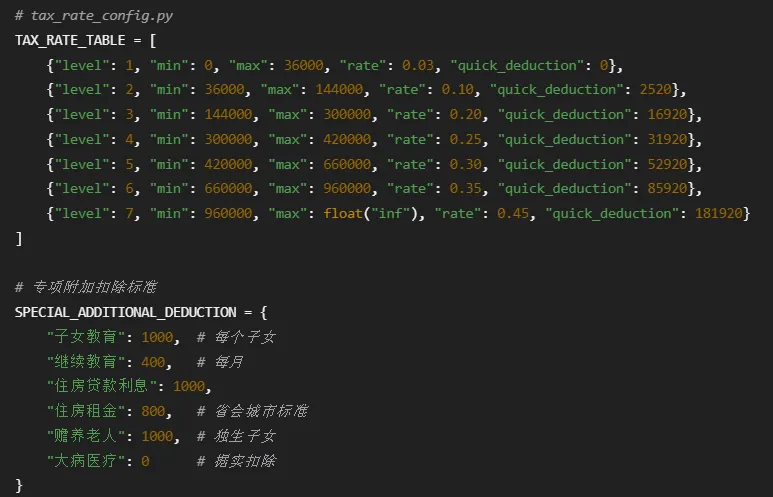
2. 七级超额累进税率表(记住这张表)

级数

累计预扣预缴应纳税所得额

税率

速算扣除数

1

不超过36,000元

3%

0

2

超过36,000元至144,000元

10%

2520

3

超过144,000元至300,000元

20%

16920

4

超过300,000元至420,000元

25%

31920

5

超过420,000元至660,000元

30%

52920

6

超过660,000元至960,000元

35%

85920

7

超过960,000元

45%

181920

关键点:税率是按“累计应纳税所得额”查表确定的,不是按当月工资。

3. 一个真实计算示例

小王每月工资20,000元,专项扣除(三险一金)3,000元,专项附加扣除2,000元。

1月份计算

  • 累计收入:20,000

  • 累计减除费用:5,000

  • 累计专项扣除:3,000

  • 累计专项附加扣除:2,000

  • 累计应纳税所得额 = 20,000 - 5,000 - 3,000 - 2,000 = 10,000元

  • 适用税率:3%(10,000 < 36,000)

  • 累计应缴个税 = 10,000 × 3% = 300元

  • 当月应缴个税 = 300 - 0 = 300元

2月份计算

  • 累计收入:20,000 + 20,000 = 40,000

  • 累计减除费用:5,000 × 2 = 10,000

  • 累计专项扣除:3,000 × 2 = 6,000

  • 累计专项附加扣除:2,000 × 2 = 4,000

  • 累计应纳税所得额 = 40,000 - 10,000 - 6,000 - 4,000 = 20,000元

  • 适用税率:3%(20,000 < 36,000)

  • 累计应缴个税 = 20,000 × 3% = 600元

  • 当月应缴个税 = 600 - 300 = 300元

看到规律了吗?每个月都要从1月累计到当前月,这就是手工计算容易出错的原因。


二、Python自动化方案:企业级个税计算系统

对于中大型企业,Python方案是首选。它不仅能计算,还能做审计、预警、批量处理

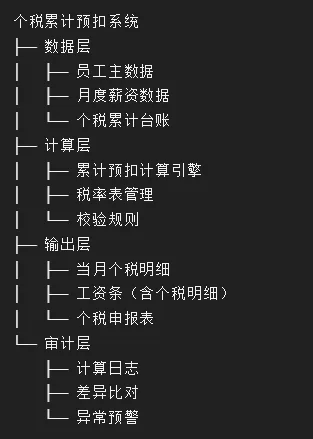
1. 系统架构设计

个税累计预扣系统

2. 税率表配置化

不要硬编码税率,要可配置:
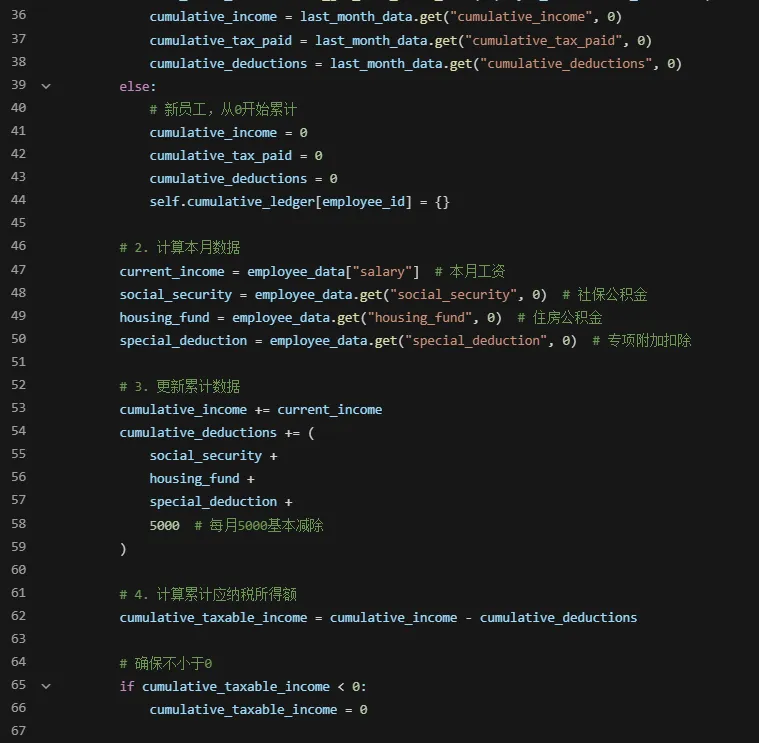
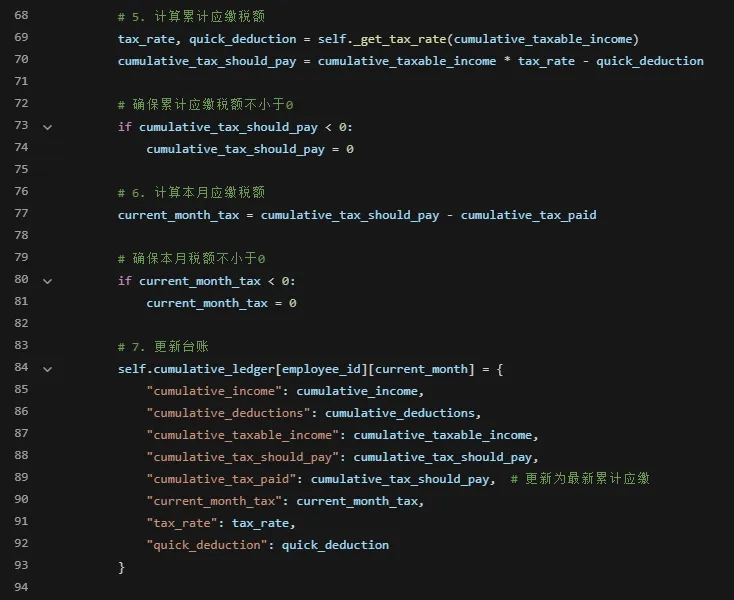
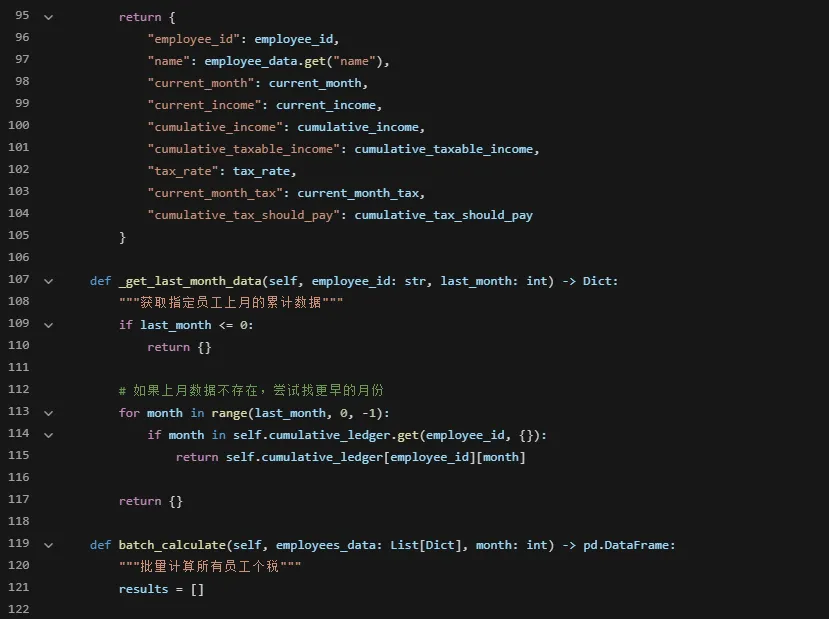
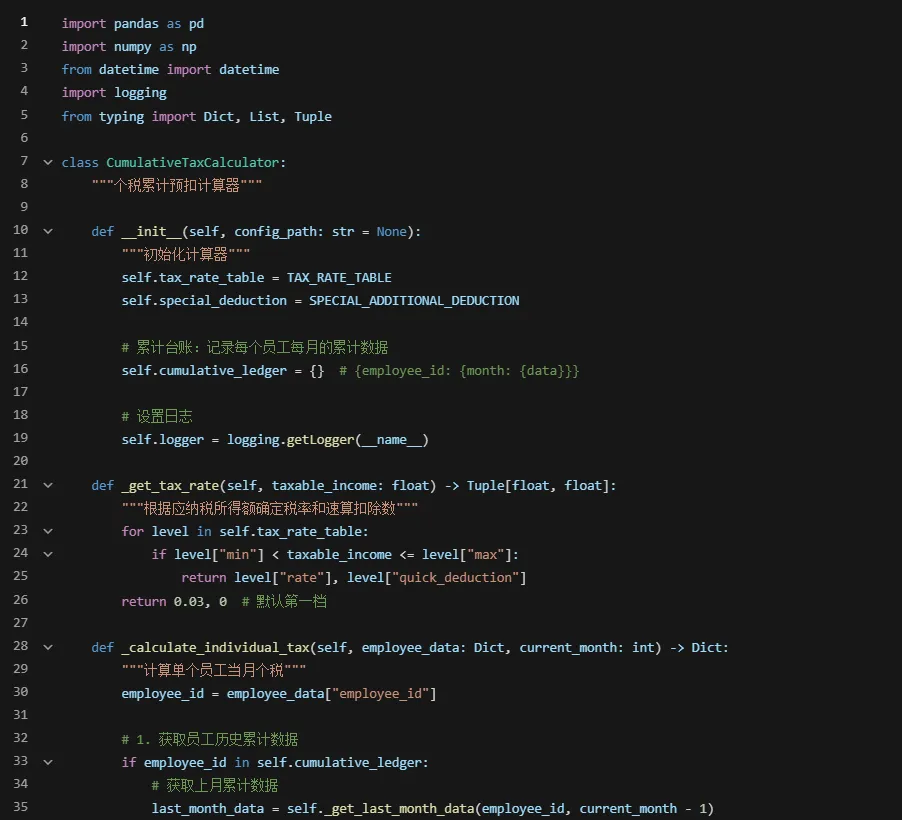
3. 核心计算引擎
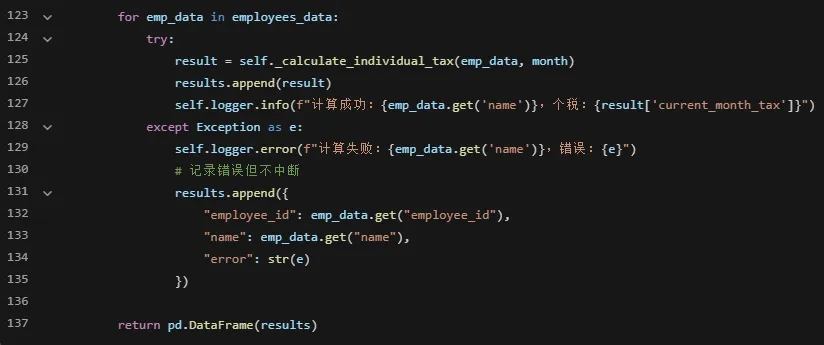
4. 数据准备与批量计算示例

def prepare_sample_data():    """准备测试数据"""    employees = []    # 员工1:高收入    employees.append({        "employee_id""001",        "name""张三",        "salary"30000,  # 月薪3万        "social_security"3200,        "housing_fund"3600,        "special_deduction"3000  # 专项附加扣除    })    # 员工2:中等收入    employees.append({        "employee_id""002",        "name""李四",        "salary"15000,        "social_security"1600,        "housing_fund"1800,        "special_deduction"2000    })    # 员工3:低收入    employees.append({        "employee_id""003",        "name""王五",        "salary"8000,        "social_security"850,        "housing_fund"960,        "special_deduction"1500    })    return employeesdef main():    """主函数:模拟全年个税计算"""    import os    from datetime import datetime    # 创建输出目录    os.makedirs("output", exist_ok=True)    os.makedirs("logs", exist_ok=True)    # 配置日志    logging.basicConfig(        level=logging.INFO,        format='%(asctime)s - %(name)s - %(levelname)s - %(message)s',        handlers=[            logging.FileHandler(f"logs/tax_calc_{datetime.now().strftime('%Y%m')}.log"),            logging.StreamHandler()        ]    )    # 初始化计算器    calculator = CumulativeTaxCalculator()    # 准备员工数据(实际应从数据库或Excel读取)    employees = prepare_sample_data()    # 模拟1-12月计算    all_results = []    for month in range(113):        print(f"\n{'='*50}")        print(f"计算第{month}月个税")        print(f"{'='*50}")        # 批量计算        month_results = calculator.batch_calculate(employees, month)        month_results["calc_month"] = month        all_results.append(month_results)        # 打印当月结果        print(month_results[["name""current_income""current_month_tax""tax_rate"]].to_string())    # 合并全年结果    yearly_results = pd.concat(all_results, ignore_index=True)    # 保存结果    yearly_results.to_excel("output/全年个税计算明细.xlsx", index=False)    # 生成汇总报表    summary = yearly_results.groupby("name").agg({        "current_income""sum",        "current_month_tax""sum"    }).reset_index()    summary.rename(columns={        "current_income""全年总收入",        "current_month_tax""全年总个税"    }, inplace=True)    summary["综合税率"] = summary["全年总个税"] / summary["全年总收入"]    print(f"\n{'='*50}")    print("全年汇总")    print(f"{'='*50}")    print(summary.to_string())    # 保存汇总    summary.to_excel("output/全年个税汇总.xlsx", index=False)    return calculator, yearly_resultsif __name__ == "__main__":    calculator, results = main()

5. 生成工资条(含个税明细)

def generate_pay_slips(tax_results: pd.DataFrame, salary_data: pd.DataFrame, month: int) -> pd.DataFrame:    """生成含个税明细的工资条"""    # 合并个税数据和薪资数据    pay_slips = pd.merge(        salary_data,        tax_results[["employee_id""current_month_tax""cumulative_taxable_income""tax_rate"]],        on="employee_id",        how="left"    )    # 计算实发工资    pay_slips["实发工资"] = (        pay_slips["应发工资"] -         pay_slips["社保个人"] -         pay_slips["公积金个人"] -         pay_slips["current_month_tax"]    )    # 添加个税明细    pay_slips["累计应纳税所得额"] = pay_slips["cumulative_taxable_income"]    pay_slips["适用税率"] = pay_slips["tax_rate"]    pay_slips["本月个税"] = pay_slips["current_month_tax"]    # 重排列顺序    columns_order = [        "employee_id""name""部门""岗位""应发工资"        "社保个人""公积金个人""累计应纳税所得额""适用税率"        "本月个税""实发工资""发薪日期"    ]    # 只保留存在的列    existing_columns = [col for col in columns_order if col in pay_slips.columns]    pay_slips = pay_slips[existing_columns]    # 格式化金额    for col in ["应发工资""社保个人""公积金个人""本月个税""实发工资""累计应纳税所得额"]:        if col in pay_slips.columns:            pay_slips[col] = pay_slips[col].apply(lambda x: f"{x:.2f}")    # 格式化税率    if "适用税率" in pay_slips.columns:        pay_slips["适用税率"] = pay_slips["适用税率"].apply(lambda x: f"{x:.1%}")    # 添加计算月份    pay_slips["计算月份"] = f"{month}月"    return pay_slipsdef save_pay_slips_to_excel(pay_slips: pd.DataFrame, month: int, template_path: str = None):    """将工资条保存到Excel"""    from openpyxl import Workbook    from openpyxl.styles import Font, Alignment, Border, Side, PatternFill    from openpyxl.utils import get_column_letter    wb = Workbook()    ws = wb.active    ws.title = f"{month}月工资条"    # 设置标题    ws.merge_cells("A1:L1")    ws["A1"] = f"{month}月工资发放明细表"    ws["A1"].font = Font(bold=True, size=16)    ws["A1"].alignment = Alignment(horizontal="center", vertical="center")    # 设置表头    headers = list(pay_slips.columns)    for col_idx, header in enumerate(headers, 1):        cell = ws.cell(row=3, column=col_idx, value=header)        cell.font = Font(bold=True)        cell.alignment = Alignment(horizontal="center", vertical="center")        cell.fill = PatternFill(start_color="D9D9D9", end_color="D9D9D9", fill_type="solid")        # 设置边框        thin_border = Border(            left=Side(style="thin"),            right=Side(style="thin"),            top=Side(style="thin"),            bottom=Side(style="thin")        )        cell.border = thin_border    # 填充数据    for row_idx, row in enumerate(pay_slips.itertuples(index=False), 4):        for col_idx, value in enumerate(row, 1):            cell = ws.cell(row=row_idx, column=col_idx, value=value)            cell.alignment = Alignment(horizontal="center", vertical="center")            cell.border = thin_border    # 自动调整列宽    for column in ws.columns:        max_length = 0        column_letter = get_column_letter(column[0].column)        for cell in column:            try:                if len(str(cell.value)) > max_length:                    max_length = len(str(cell.value))            except:                pass        adjusted_width = min(max_length + 230)        ws.column_dimensions[column_letter].width = adjusted_width    # 保存文件    filename = f"output/{month}月工资条.xlsx"    wb.save(filename)    print(f"工资条已保存到:{filename}")    return filename

6. 验证与审计功能

def validate_tax_calculation(tax_results: pd.DataFrame, previous_month_results: pd.DataFrame = None):    """验证个税计算结果"""    errors = []    warnings = []    # 1. 检查个税是否为负数    negative_tax = tax_results[tax_results["current_month_tax"] < 0]    if len(negative_tax) > 0:        errors.append(f"发现{len(negative_tax)}个员工个税为负")    # 2. 检查税率是否正确    for _, row in tax_results.iterrows():        taxable_income = row["cumulative_taxable_income"]        tax_rate = row["tax_rate"]        # 根据应纳税所得额验证税率        expected_rate, _ = CumulativeTaxCalculator()._get_tax_rate(taxable_income)        if abs(tax_rate - expected_rate) > 0.001:            errors.append(f"员工{row['name']}税率计算错误:实际{tax_rate},预期{expected_rate}")    # 3. 检查累计数据连续性    if previous_month_results is not None:        for emp_id in tax_results["employee_id"].unique():            current = tax_results[tax_results["employee_id"] == emp_id]            previous = previous_month_results[previous_month_results["employee_id"] == emp_id]            if len(previous) > 0:                # 检查累计收入是否连续                current_cum_income = current["cumulative_income"].iloc[0]                prev_cum_income = previous["cumulative_income"].iloc[0]                current_income = current["current_income"].iloc[0]                expected_cum_income = prev_cum_income + current_income                if abs(current_cum_income - expected_cum_income) > 0.01:                    warnings.append(f"员工{emp_id}累计收入不连续")    # 4. 检查异常值    high_tax_rate = tax_results[tax_results["tax_rate"] > 0.3]  # 税率超过30%    if len(high_tax_rate) > 0:        warnings.append(f"发现{len(high_tax_rate)}个员工适用高税率(>30%)")    return errors, warnings

三、VBA方案:Excel内的一体化解决方案

如果公司没有Python环境,或者HR同事习惯用Excel,VBA方案也能实现完整的累计预扣计算。

1. 数据结构设计

在Excel中建立以下工作表:

  1. 员工主表:员工基本信息、专项附加扣除

  2. 薪资表:每月应发工资、社保、公积金

  3. 累计台账:记录每月累计数据

  4. 税率表:七级超额累进税率

  5. 计算结果:当月个税和工资条

  6. 工资条:最终输出的工资条

2. 核心计算函数(VBA)

' 在标准模块中定义Option Explicit' 税率结构Type TaxRate    Level As Integer    MinIncome As Double    MaxIncome As Double    Rate As Double    QuickDeduction As DoubleEnd Type' 员工累计数据Type EmployeeCumulative    EmployeeID As String    Month As Integer    CumulativeIncome As Double    CumulativeDeduction As Double    CumulativeTaxableIncome As Double    CumulativeTaxPaid As DoubleEnd Type' 全局税率表Dim taxRates(1 To 7As TaxRate' 初始化税率表Sub InitializeTaxRates()    ' 第一级    taxRates(1).Level = 1    taxRates(1).MinIncome = 0    taxRates(1).MaxIncome = 36000    taxRates(1).Rate = 0.03    taxRates(1).QuickDeduction = 0    ' 第二级    taxRates(2).Level = 2    taxRates(2).MinIncome = 36000    taxRates(2).MaxIncome = 144000    taxRates(2).Rate = 0.1    taxRates(2).QuickDeduction = 2520    ' 第三级    taxRates(3).Level = 3    taxRates(3).MinIncome = 144000    taxRates(3).MaxIncome = 300000    taxRates(3).Rate = 0.2    taxRates(3).QuickDeduction = 16920    ' 第四级    taxRates(4).Level = 4    taxRates(4).MinIncome = 300000    taxRates(4).MaxIncome = 420000    taxRates(4).Rate = 0.25    taxRates(4).QuickDeduction = 31920    ' 第五级    taxRates(5).Level = 5    taxRates(5).MinIncome = 420000    taxRates(5).MaxIncome = 660000    taxRates(5).Rate = 0.3    taxRates(5).QuickDeduction = 52920    ' 第六级    taxRates(6).Level = 6    taxRates(6).MinIncome = 660000    taxRates(6).MaxIncome = 960000    taxRates(6).Rate = 0.35    taxRates(6).QuickDeduction = 85920    ' 第七级    taxRates(7).Level = 7    taxRates(7).MinIncome = 960000    taxRates(7).MaxIncome = 999999999    taxRates(7).Rate = 0.45    taxRates(7).QuickDeduction = 181920End Sub' 根据应纳税所得额获取税率Function GetTaxRate(taxableIncome As Double, ByRef quickDeduction As Double) As Double    Dim i As Integer    For i = 1 To 7        If taxableIncome > taxRates(i).MinIncome And taxableIncome <= taxRates(i).MaxIncome Then            GetTaxRate = taxRates(i).Rate            quickDeduction = taxRates(i).QuickDeduction            Exit Function        End If    Next i    ' 默认第一档    GetTaxRate = 0.03    quickDeduction = 0End Function' 计算单个员工当月个税Function CalculateMonthlyTax(employeeID As String, _                           currentMonth As Integer, _                           currentSalary As Double, _                           socialSecurity As Double, _                           housingFund As Double, _                           specialDeduction As Double) As Double    ' 静态变量保存累计台账    Static cumulativeData As Collection    If cumulativeData Is Nothing Then        Set cumulativeData = New Collection    End If    Dim empKey As String    empKey = employeeID & "_" & CStr(currentMonth - 1)  ' 上月的key    Dim lastMonthIncome As Double, lastMonthDeduction As Double, lastMonthTaxPaid As Double    ' 获取上月累计数据    On Error Resume Next    Dim lastData As EmployeeCumulative    Set lastData = cumulativeData(empKey)    If Err.Number = 0 Then        lastMonthIncome = lastData.CumulativeIncome        lastMonthDeduction = lastData.CumulativeDeduction        lastMonthTaxPaid = lastData.CumulativeTaxPaid    Else        ' 新员工或1月份        lastMonthIncome = 0        lastMonthDeduction = 0        lastMonthTaxPaid = 0    End If    On Error GoTo 0    ' 计算本月累计    Dim cumulativeIncome As Double    Dim cumulativeDeduction As Double    cumulativeIncome = lastMonthIncome + currentSalary    cumulativeDeduction = lastMonthDeduction + socialSecurity + housingFund + specialDeduction + 5000    ' 计算累计应纳税所得额    Dim cumulativeTaxableIncome As Double    cumulativeTaxableIncome = cumulativeIncome - cumulativeDeduction    If cumulativeTaxableIncome < 0 Then cumulativeTaxableIncome = 0    ' 计算累计应缴税额    Dim quickDeduction As Double    Dim taxRate As Double    Dim cumulativeTaxShouldPay As Double    taxRate = GetTaxRate(cumulativeTaxableIncome, quickDeduction)    cumulativeTaxShouldPay = cumulativeTaxableIncome * taxRate - quickDeduction    If cumulativeTaxShouldPay < 0 Then cumulativeTaxShouldPay = 0    ' 计算本月应缴税额    Dim currentMonthTax As Double    currentMonthTax = cumulativeTaxShouldPay - lastMonthTaxPaid    If currentMonthTax < 0 Then currentMonthTax = 0    ' 保存本月累计数据    Dim currentData As EmployeeCumulative    currentData.EmployeeID = employeeID    currentData.Month = currentMonth    currentData.CumulativeIncome = cumulativeIncome    currentData.CumulativeDeduction = cumulativeDeduction    currentData.CumulativeTaxableIncome = cumulativeTaxableIncome    currentData.CumulativeTaxPaid = cumulativeTaxShouldPay    Dim currentKey As String    currentKey = employeeID & "_" & CStr(currentMonth)    ' 删除旧的(如果存在)    On Error Resume Next    cumulativeData.Remove currentKey    On Error GoTo 0    ' 添加新的    cumulativeData.Add currentData, currentKey    ' 返回结果    CalculateMonthlyTax = currentMonthTaxEnd Function

3. Excel公式实现累计计算

如果你不想用VBA,也可以用Excel公式实现:

# 在Excel中建立以下公式# 假设数据在以下位置:# A列:员工ID# B列:姓名# C列:月份# D列:当月工资# E列:社保个人# F列:公积金个人# G列:专项附加扣除# H列:累计收入(上月累计+本月工资)# I列:累计扣除(上月累计+本月扣除+5000)# J列:累计应纳税所得额(H-I,不小于0)# K列:税率(用VLOOKUP在税率表查找)# L列:速算扣除数# M列:累计应缴税额(J*K-L)# N列:本月个税(本月累计-上月累计)# 累计收入公式(H2单元格):IF(C2=1, D2, VLOOKUP(A2&"_"&C2-1, 累计台账!$A:$E5FALSE) + D2)# 累计扣除公式(I2单元格):IF(C2=1, E2+F2+G2+5000    VLOOKUP(A2&"_"&C2-1, 累计台账!$A:$E6FALSE) + E2+F2+G2+5000)# 税率公式(K2单元格):LOOKUP(J2, {0,0.03;36000,0.1;144000,0.2;300000,0.25;420000,0.3;660000,0.35;960000,0.45})

4. 批量计算与工资条生成

Sub BatchCalculateTax()    Dim wsSalary As Worksheet, wsResult As Worksheet, wsLedger As Worksheet    Dim wsPaySlip As Worksheet    Set wsSalary = ThisWorkbook.Worksheets("薪资表")    Set wsResult = ThisWorkbook.Worksheets("计算结果")    Set wsLedger = ThisWorkbook.Worksheets("累计台账")    Set wsPaySlip = ThisWorkbook.Worksheets("工资条")    ' 初始化税率表    InitializeTaxRates    ' 清空结果表    wsResult.Cells.Clear    wsPaySlip.Cells.Clear    ' 设置表头    wsResult.Range("A1").Value = "员工ID"    wsResult.Range("B1").Value = "姓名"    wsResult.Range("C1").Value = "月份"    wsResult.Range("D1").Value = "当月工资"    wsResult.Range("E1").Value = "累计收入"    wsResult.Range("F1").Value = "累计扣除"    wsResult.Range("G1").Value = "累计应纳税所得额"    wsResult.Range("H1").Value = "税率"    wsResult.Range("I1").Value = "速算扣除数"    wsResult.Range("J1").Value = "累计应缴税额"    wsResult.Range("K1").Value = "本月个税"    Dim lastRow As Long, i As Long, resultRow As Long    lastRow = wsSalary.Cells(wsSalary.Rows.Count, "A").End(xlUp).Row    resultRow = 2    Application.ScreenUpdating = False    Application.Calculation = xlCalculationManual    ' 清空静态变量    Static cumulativeData As Collection    Set cumulativeData = Nothing    For i = 2 To lastRow        Dim employeeID As String, empName As String, monthNum As Integer        Dim salary As Double, socialSecurity As Double, housingFund As Double        Dim specialDeduction As Double        employeeID = wsSalary.Cells(i, 1).Value        empName = wsSalary.Cells(i, 2).Value        monthNum = wsSalary.Cells(i, 3).Value        salary = wsSalary.Cells(i, 4).Value        socialSecurity = wsSalary.Cells(i, 5).Value        housingFund = wsSalary.Cells(i, 6).Value        specialDeduction = wsSalary.Cells(i, 7).Value        ' 计算个税        Dim monthlyTax As Double        monthlyTax = CalculateMonthlyTax(employeeID, monthNum, salary, _                                        socialSecurity, housingFund, specialDeduction)        ' 写入结果        wsResult.Cells(resultRow, 1).Value = employeeID        wsResult.Cells(resultRow, 2).Value = empName        wsResult.Cells(resultRow, 3).Value = monthNum        wsResult.Cells(resultRow, 4).Value = salary        wsResult.Cells(resultRow, 11).Value = monthlyTax        ' 生成工资条        GeneratePaySlip wsPaySlip, resultRow, employeeID, empName, monthNum, _                       salary, socialSecurity, housingFund, monthlyTax        resultRow = resultRow + 1        ' 进度提示        If i Mod 10 = 0 Then            Application.StatusBar = "正在计算第 " & i & " 条记录..."        End If    Next i    Application.StatusBar = ""    Application.ScreenUpdating = True    Application.Calculation = xlCalculationAutomatic    MsgBox "计算完成!共计算 " & (resultRow - 2) & " 名员工", vbInformationEnd SubSub GeneratePaySlip(ws As Worksheet, rowNum As Long, _                   empID As String, empName As String, monthNum As Integer, _                   salary As Double, socialSecurity As Double, _                   housingFund As Double, tax As Double)    Dim startRow As Long    startRow = (rowNum - 2) * 8 + 1  ' 每个员工8行    ' 工资条标题    ws.Cells(startRow, 1).Value = "员工ID:"    ws.Cells(startRow, 2).Value = empID    ws.Cells(startRow, 4).Value = "姓名:"    ws.Cells(startRow, 5).Value = empName    ws.Cells(startRow, 7).Value = "月份:"    ws.Cells(startRow, 8).Value = monthNum & "月"    ' 工资明细    ws.Cells(startRow + 2, 1).Value = "应发工资:"    ws.Cells(startRow + 2, 2).Value = Format(salary, "0.00")    ws.Cells(startRow + 3, 1).Value = "社保个人:"    ws.Cells(startRow + 3, 2).Value = Format(socialSecurity, "0.00")    ws.Cells(startRow + 4, 1).Value = "公积金个人:"    ws.Cells(startRow + 4, 2).Value = Format(housingFund, "0.00")    ws.Cells(startRow + 5, 1).Value = "个人所得税:"    ws.Cells(startRow + 5, 2).Value = Format(tax, "0.00")    ws.Cells(startRow + 6, 1).Value = "实发工资:"    ws.Cells(startRow + 6, 2).Value = Format(salary - socialSecurity - housingFund - tax, "0.00")    ' 添加边框    Dim rng As Range    Set rng = ws.Range(ws.Cells(startRow, 1), ws.Cells(startRow + 6, 8))    With rng.Borders        .LineStyle = xlContinuous        .Color = RGB(0, 0, 0)        .Weight = xlThin    End With    ' 添加分隔线    ws.Rows(startRow + 7).RowHeight = 5End Sub

四、Python vs VBA方案对比

维度

Python方案

VBA方案

数据处理能力

✅ 强,支持百万级数据

⚠️ 弱,万级以下尚可

计算速度

✅ 快,支持并行计算

⚠️ 慢,逐行计算

维护性

✅ 优秀,模块化设计

⚠️ 一般,代码易混乱

扩展性

✅ 强,可对接各类系统

❌ 弱,局限于Excel

审计跟踪

✅ 完整日志和版本控制

⚠️ 有限,依赖Excel文件

错误处理

✅ 完善,有异常捕获

⚠️ 基础,依赖On Error

部署难度

⚠️ 中,需要Python环境

✅ 易,Excel自带

学习成本

⚠️ 中,需要Python基础

✅ 低,Excel用户友好

多年度支持

✅ 容易,数据库存储

⚠️ 困难,文件管理复杂

选择建议:

  1. 员工数超过1000人 → 用Python

  2. 需要对接HR系统 → 用Python

  3. 需要多年度数据管理 → 用Python

  4. HR部门无IT支持 → 用VBA

  5. 临时性需求 → 用VBA

  6. 数据量小,但需要快速验证 → 用VBA


五、实施注意事项(避坑指南)

1. 专项附加扣除的准确获取

个税计算最大的难点不是公式,而是专项附加扣除数据的准确性

Python方案可以对接个税APP的导出数据:

import pandas as pddef load_special_deductions(excel_file):    """从个税APP导出文件加载专项附加扣除"""    df = pd.read_excel(excel_file)    deductions_map = {}    for _, row in df.iterrows():        emp_id = row["纳税人识别号"]  # 或工号        deduction_type = row["扣除项目"]        amount = row["扣除金额"]        if emp_id not in deductions_map:            deductions_map[emp_id] = 0        # 累加各项扣除        deductions_map[emp_id] += amount    return deductions_map

2. 年中入职/离职的特殊处理

年中入职:从入职月开始计算,前面月份为0

年中离职:计算到离职月,后续月份不计算

def calculate_for_mid_year_employee(emp_data, entry_month, current_month):    """处理年中入职员工"""    if current_month < entry_month:        # 入职前的月份,不计算        return 0    # 计算累计月份数    cumulative_months = current_month - entry_month + 1    # 累计减除费用 = 5000 × 累计月份    basic_deduction = 5000 * cumulative_months    # 其他计算逻辑相同...

3. 年终奖的单独计算

年终奖有单独的计税方式(可选并入综合所得或单独计算):

def calculate_bonus_tax(bonus_amount, merge_with_annual=False, annual_income=0):    """计算年终奖个税"""    if merge_with_annual:        # 并入综合所得        return calculate_annual_tax(annual_income + bonus_amount) - calculate_annual_tax(annual_income)    else:        # 单独计算        monthly_bonus = bonus_amount / 12        # 查找税率        for level in TAX_RATE_TABLE:            if level["min"] < monthly_bonus <= level["max"]:                tax = bonus_amount * level["rate"] - level["quick_deduction"]                return tax        return 0

4. 数据验证与审计

每月计算完成后必须验证:

  1. 总额验证:个税总额是否等于代扣代缴总额

  2. 连续性验证:累计数据是否连续

  3. 合规性验证:有无超出税率表的异常值

  4. 完整性验证:所有员工是否都计算了


六、练习题

  1. 在累计预扣法中,计算当月个税的公式是?

    A. 当月工资 × 税率 - 速算扣除数

    B. (累计应纳税所得额 × 税率 - 速算扣除数) - 累计已缴税额

    C. 全年总收入 × 税率 - 速算扣除数

    D. 当月应纳税所得额 × 税率

  2. 某员工1-6月累计应纳税所得额为35,000元,7月工资增加后累计应纳税所得额变为40,000元,7月应缴纳多少个人所得税?

    A. 40,000 × 10% - 2,520 = 1,480元

    B. (40,000 × 10% - 2,520) - (35,000 × 3%) = 1,480 - 1,050 = 430元

    C. 5,000 × 10% = 500元

    D. 40,000 × 3% = 1,200元

  3. Python方案中,使用什么数据结构存储税率表最合适?

    A. 字典列表

    B. 元组

    C. 集合

    D. 字符串

  4. VBA方案中,静态变量(Static)的主要作用是?

    A. 提高计算速度

    B. 在过程调用间保持值不变

    C. 减少内存占用

    D. 使变量对所有模块可见

  5. 在个税计算中,最重要的数据验证是?

    A. 检查计算结果是否为整数

    B. 验证累计数据的连续性

    C. 检查员工姓名是否正确

    D. 验证Excel格式


答案区

  1. B - 累计预扣法的核心公式

  2. B - 累计计算,减去前期已缴税额

  3. A - 字典列表便于查询和扩展

  4. B - 静态变量在过程调用间保持值

  5. B - 累计数据的连续性是准确性的关键

最新文章

随机文章

基本 文件 流程 错误 SQL 调试
  1. 请求信息 : 2026-07-08 04:24:56 HTTP/2.0 GET : https://h.sjds.net/a/526789.html
  2. 运行时间 : 0.149264s [ 吞吐率:6.70req/s ] 内存消耗:4,469.60kb 文件加载:140
  3. 缓存信息 : 0 reads,0 writes
  4. 会话信息 : SESSION_ID=ea3b4b6620348fe3faec662cec6ed7d7
  1. /yingpanguazai/ssd/ssd1/www/h.sjds.net/public/index.php ( 0.79 KB )
  2. /yingpanguazai/ssd/ssd1/www/h.sjds.net/vendor/autoload.php ( 0.17 KB )
  3. /yingpanguazai/ssd/ssd1/www/h.sjds.net/vendor/composer/autoload_real.php ( 2.49 KB )
  4. /yingpanguazai/ssd/ssd1/www/h.sjds.net/vendor/composer/platform_check.php ( 0.90 KB )
  5. /yingpanguazai/ssd/ssd1/www/h.sjds.net/vendor/composer/ClassLoader.php ( 14.03 KB )
  6. /yingpanguazai/ssd/ssd1/www/h.sjds.net/vendor/composer/autoload_static.php ( 4.90 KB )
  7. /yingpanguazai/ssd/ssd1/www/h.sjds.net/vendor/topthink/think-helper/src/helper.php ( 8.34 KB )
  8. /yingpanguazai/ssd/ssd1/www/h.sjds.net/vendor/topthink/think-validate/src/helper.php ( 2.19 KB )
  9. /yingpanguazai/ssd/ssd1/www/h.sjds.net/vendor/topthink/think-orm/src/helper.php ( 1.47 KB )
  10. /yingpanguazai/ssd/ssd1/www/h.sjds.net/vendor/topthink/think-orm/stubs/load_stubs.php ( 0.16 KB )
  11. /yingpanguazai/ssd/ssd1/www/h.sjds.net/vendor/topthink/framework/src/think/Exception.php ( 1.69 KB )
  12. /yingpanguazai/ssd/ssd1/www/h.sjds.net/vendor/topthink/think-container/src/Facade.php ( 2.71 KB )
  13. /yingpanguazai/ssd/ssd1/www/h.sjds.net/vendor/symfony/deprecation-contracts/function.php ( 0.99 KB )
  14. /yingpanguazai/ssd/ssd1/www/h.sjds.net/vendor/symfony/polyfill-mbstring/bootstrap.php ( 8.26 KB )
  15. /yingpanguazai/ssd/ssd1/www/h.sjds.net/vendor/symfony/polyfill-mbstring/bootstrap80.php ( 9.78 KB )
  16. /yingpanguazai/ssd/ssd1/www/h.sjds.net/vendor/symfony/var-dumper/Resources/functions/dump.php ( 1.49 KB )
  17. /yingpanguazai/ssd/ssd1/www/h.sjds.net/vendor/topthink/think-dumper/src/helper.php ( 0.18 KB )
  18. /yingpanguazai/ssd/ssd1/www/h.sjds.net/vendor/symfony/var-dumper/VarDumper.php ( 4.30 KB )
  19. /yingpanguazai/ssd/ssd1/www/h.sjds.net/vendor/topthink/framework/src/think/App.php ( 15.30 KB )
  20. /yingpanguazai/ssd/ssd1/www/h.sjds.net/vendor/topthink/think-container/src/Container.php ( 15.76 KB )
  21. /yingpanguazai/ssd/ssd1/www/h.sjds.net/vendor/psr/container/src/ContainerInterface.php ( 1.02 KB )
  22. /yingpanguazai/ssd/ssd1/www/h.sjds.net/app/provider.php ( 0.19 KB )
  23. /yingpanguazai/ssd/ssd1/www/h.sjds.net/vendor/topthink/framework/src/think/Http.php ( 6.04 KB )
  24. /yingpanguazai/ssd/ssd1/www/h.sjds.net/vendor/topthink/think-helper/src/helper/Str.php ( 7.29 KB )
  25. /yingpanguazai/ssd/ssd1/www/h.sjds.net/vendor/topthink/framework/src/think/Env.php ( 4.68 KB )
  26. /yingpanguazai/ssd/ssd1/www/h.sjds.net/app/common.php ( 0.03 KB )
  27. /yingpanguazai/ssd/ssd1/www/h.sjds.net/vendor/topthink/framework/src/helper.php ( 18.78 KB )
  28. /yingpanguazai/ssd/ssd1/www/h.sjds.net/vendor/topthink/framework/src/think/Config.php ( 5.54 KB )
  29. /yingpanguazai/ssd/ssd1/www/h.sjds.net/config/app.php ( 0.95 KB )
  30. /yingpanguazai/ssd/ssd1/www/h.sjds.net/config/cache.php ( 0.78 KB )
  31. /yingpanguazai/ssd/ssd1/www/h.sjds.net/config/console.php ( 0.23 KB )
  32. /yingpanguazai/ssd/ssd1/www/h.sjds.net/config/cookie.php ( 0.56 KB )
  33. /yingpanguazai/ssd/ssd1/www/h.sjds.net/config/database.php ( 2.48 KB )
  34. /yingpanguazai/ssd/ssd1/www/h.sjds.net/vendor/topthink/framework/src/think/facade/Env.php ( 1.67 KB )
  35. /yingpanguazai/ssd/ssd1/www/h.sjds.net/config/filesystem.php ( 0.61 KB )
  36. /yingpanguazai/ssd/ssd1/www/h.sjds.net/config/lang.php ( 0.91 KB )
  37. /yingpanguazai/ssd/ssd1/www/h.sjds.net/config/log.php ( 1.35 KB )
  38. /yingpanguazai/ssd/ssd1/www/h.sjds.net/config/middleware.php ( 0.19 KB )
  39. /yingpanguazai/ssd/ssd1/www/h.sjds.net/config/route.php ( 1.89 KB )
  40. /yingpanguazai/ssd/ssd1/www/h.sjds.net/config/session.php ( 0.57 KB )
  41. /yingpanguazai/ssd/ssd1/www/h.sjds.net/config/trace.php ( 0.34 KB )
  42. /yingpanguazai/ssd/ssd1/www/h.sjds.net/config/view.php ( 0.82 KB )
  43. /yingpanguazai/ssd/ssd1/www/h.sjds.net/app/event.php ( 0.25 KB )
  44. /yingpanguazai/ssd/ssd1/www/h.sjds.net/vendor/topthink/framework/src/think/Event.php ( 7.67 KB )
  45. /yingpanguazai/ssd/ssd1/www/h.sjds.net/app/service.php ( 0.13 KB )
  46. /yingpanguazai/ssd/ssd1/www/h.sjds.net/app/AppService.php ( 0.26 KB )
  47. /yingpanguazai/ssd/ssd1/www/h.sjds.net/vendor/topthink/framework/src/think/Service.php ( 1.64 KB )
  48. /yingpanguazai/ssd/ssd1/www/h.sjds.net/vendor/topthink/framework/src/think/Lang.php ( 7.35 KB )
  49. /yingpanguazai/ssd/ssd1/www/h.sjds.net/vendor/topthink/framework/src/lang/zh-cn.php ( 13.70 KB )
  50. /yingpanguazai/ssd/ssd1/www/h.sjds.net/vendor/topthink/framework/src/think/initializer/Error.php ( 3.31 KB )
  51. /yingpanguazai/ssd/ssd1/www/h.sjds.net/vendor/topthink/framework/src/think/initializer/RegisterService.php ( 1.33 KB )
  52. /yingpanguazai/ssd/ssd1/www/h.sjds.net/vendor/services.php ( 0.14 KB )
  53. /yingpanguazai/ssd/ssd1/www/h.sjds.net/vendor/topthink/framework/src/think/service/PaginatorService.php ( 1.52 KB )
  54. /yingpanguazai/ssd/ssd1/www/h.sjds.net/vendor/topthink/framework/src/think/service/ValidateService.php ( 0.99 KB )
  55. /yingpanguazai/ssd/ssd1/www/h.sjds.net/vendor/topthink/framework/src/think/service/ModelService.php ( 2.04 KB )
  56. /yingpanguazai/ssd/ssd1/www/h.sjds.net/vendor/topthink/think-trace/src/Service.php ( 0.77 KB )
  57. /yingpanguazai/ssd/ssd1/www/h.sjds.net/vendor/topthink/framework/src/think/Middleware.php ( 6.72 KB )
  58. /yingpanguazai/ssd/ssd1/www/h.sjds.net/vendor/topthink/framework/src/think/initializer/BootService.php ( 0.77 KB )
  59. /yingpanguazai/ssd/ssd1/www/h.sjds.net/vendor/topthink/think-orm/src/Paginator.php ( 11.86 KB )
  60. /yingpanguazai/ssd/ssd1/www/h.sjds.net/vendor/topthink/think-validate/src/Validate.php ( 63.20 KB )
  61. /yingpanguazai/ssd/ssd1/www/h.sjds.net/vendor/topthink/think-orm/src/Model.php ( 23.55 KB )
  62. /yingpanguazai/ssd/ssd1/www/h.sjds.net/vendor/topthink/think-orm/src/model/concern/Attribute.php ( 21.05 KB )
  63. /yingpanguazai/ssd/ssd1/www/h.sjds.net/vendor/topthink/think-orm/src/model/concern/AutoWriteData.php ( 4.21 KB )
  64. /yingpanguazai/ssd/ssd1/www/h.sjds.net/vendor/topthink/think-orm/src/model/concern/Conversion.php ( 6.44 KB )
  65. /yingpanguazai/ssd/ssd1/www/h.sjds.net/vendor/topthink/think-orm/src/model/concern/DbConnect.php ( 5.16 KB )
  66. /yingpanguazai/ssd/ssd1/www/h.sjds.net/vendor/topthink/think-orm/src/model/concern/ModelEvent.php ( 2.33 KB )
  67. /yingpanguazai/ssd/ssd1/www/h.sjds.net/vendor/topthink/think-orm/src/model/concern/RelationShip.php ( 28.29 KB )
  68. /yingpanguazai/ssd/ssd1/www/h.sjds.net/vendor/topthink/think-helper/src/contract/Arrayable.php ( 0.09 KB )
  69. /yingpanguazai/ssd/ssd1/www/h.sjds.net/vendor/topthink/think-helper/src/contract/Jsonable.php ( 0.13 KB )
  70. /yingpanguazai/ssd/ssd1/www/h.sjds.net/vendor/topthink/think-orm/src/model/contract/Modelable.php ( 0.09 KB )
  71. /yingpanguazai/ssd/ssd1/www/h.sjds.net/vendor/topthink/framework/src/think/Db.php ( 2.88 KB )
  72. /yingpanguazai/ssd/ssd1/www/h.sjds.net/vendor/topthink/think-orm/src/DbManager.php ( 8.52 KB )
  73. /yingpanguazai/ssd/ssd1/www/h.sjds.net/vendor/topthink/framework/src/think/Log.php ( 6.28 KB )
  74. /yingpanguazai/ssd/ssd1/www/h.sjds.net/vendor/topthink/framework/src/think/Manager.php ( 3.92 KB )
  75. /yingpanguazai/ssd/ssd1/www/h.sjds.net/vendor/psr/log/src/LoggerTrait.php ( 2.69 KB )
  76. /yingpanguazai/ssd/ssd1/www/h.sjds.net/vendor/psr/log/src/LoggerInterface.php ( 2.71 KB )
  77. /yingpanguazai/ssd/ssd1/www/h.sjds.net/vendor/topthink/framework/src/think/Cache.php ( 4.92 KB )
  78. /yingpanguazai/ssd/ssd1/www/h.sjds.net/vendor/psr/simple-cache/src/CacheInterface.php ( 4.71 KB )
  79. /yingpanguazai/ssd/ssd1/www/h.sjds.net/vendor/topthink/think-helper/src/helper/Arr.php ( 16.63 KB )
  80. /yingpanguazai/ssd/ssd1/www/h.sjds.net/vendor/topthink/framework/src/think/cache/driver/File.php ( 7.84 KB )
  81. /yingpanguazai/ssd/ssd1/www/h.sjds.net/vendor/topthink/framework/src/think/cache/Driver.php ( 9.03 KB )
  82. /yingpanguazai/ssd/ssd1/www/h.sjds.net/vendor/topthink/framework/src/think/contract/CacheHandlerInterface.php ( 1.99 KB )
  83. /yingpanguazai/ssd/ssd1/www/h.sjds.net/app/Request.php ( 0.09 KB )
  84. /yingpanguazai/ssd/ssd1/www/h.sjds.net/vendor/topthink/framework/src/think/Request.php ( 55.78 KB )
  85. /yingpanguazai/ssd/ssd1/www/h.sjds.net/app/middleware.php ( 0.25 KB )
  86. /yingpanguazai/ssd/ssd1/www/h.sjds.net/vendor/topthink/framework/src/think/Pipeline.php ( 2.61 KB )
  87. /yingpanguazai/ssd/ssd1/www/h.sjds.net/vendor/topthink/think-trace/src/TraceDebug.php ( 3.40 KB )
  88. /yingpanguazai/ssd/ssd1/www/h.sjds.net/vendor/topthink/framework/src/think/middleware/SessionInit.php ( 1.94 KB )
  89. /yingpanguazai/ssd/ssd1/www/h.sjds.net/vendor/topthink/framework/src/think/Session.php ( 1.80 KB )
  90. /yingpanguazai/ssd/ssd1/www/h.sjds.net/vendor/topthink/framework/src/think/session/driver/File.php ( 6.27 KB )
  91. /yingpanguazai/ssd/ssd1/www/h.sjds.net/vendor/topthink/framework/src/think/contract/SessionHandlerInterface.php ( 0.87 KB )
  92. /yingpanguazai/ssd/ssd1/www/h.sjds.net/vendor/topthink/framework/src/think/session/Store.php ( 7.12 KB )
  93. /yingpanguazai/ssd/ssd1/www/h.sjds.net/vendor/topthink/framework/src/think/Route.php ( 23.73 KB )
  94. /yingpanguazai/ssd/ssd1/www/h.sjds.net/vendor/topthink/framework/src/think/route/RuleName.php ( 5.75 KB )
  95. /yingpanguazai/ssd/ssd1/www/h.sjds.net/vendor/topthink/framework/src/think/route/Domain.php ( 2.53 KB )
  96. /yingpanguazai/ssd/ssd1/www/h.sjds.net/vendor/topthink/framework/src/think/route/RuleGroup.php ( 22.43 KB )
  97. /yingpanguazai/ssd/ssd1/www/h.sjds.net/vendor/topthink/framework/src/think/route/Rule.php ( 26.95 KB )
  98. /yingpanguazai/ssd/ssd1/www/h.sjds.net/vendor/topthink/framework/src/think/route/RuleItem.php ( 9.78 KB )
  99. /yingpanguazai/ssd/ssd1/www/h.sjds.net/route/app.php ( 1.72 KB )
  100. /yingpanguazai/ssd/ssd1/www/h.sjds.net/vendor/topthink/framework/src/think/facade/Route.php ( 4.70 KB )
  101. /yingpanguazai/ssd/ssd1/www/h.sjds.net/vendor/topthink/framework/src/think/route/dispatch/Controller.php ( 4.74 KB )
  102. /yingpanguazai/ssd/ssd1/www/h.sjds.net/vendor/topthink/framework/src/think/route/Dispatch.php ( 10.44 KB )
  103. /yingpanguazai/ssd/ssd1/www/h.sjds.net/app/controller/Index.php ( 4.81 KB )
  104. /yingpanguazai/ssd/ssd1/www/h.sjds.net/app/BaseController.php ( 2.05 KB )
  105. /yingpanguazai/ssd/ssd1/www/h.sjds.net/vendor/topthink/think-orm/src/facade/Db.php ( 0.93 KB )
  106. /yingpanguazai/ssd/ssd1/www/h.sjds.net/vendor/topthink/think-orm/src/db/connector/Mysql.php ( 5.44 KB )
  107. /yingpanguazai/ssd/ssd1/www/h.sjds.net/vendor/topthink/think-orm/src/db/PDOConnection.php ( 52.47 KB )
  108. /yingpanguazai/ssd/ssd1/www/h.sjds.net/vendor/topthink/think-orm/src/db/Connection.php ( 8.39 KB )
  109. /yingpanguazai/ssd/ssd1/www/h.sjds.net/vendor/topthink/think-orm/src/db/ConnectionInterface.php ( 4.57 KB )
  110. /yingpanguazai/ssd/ssd1/www/h.sjds.net/vendor/topthink/think-orm/src/db/builder/Mysql.php ( 16.58 KB )
  111. /yingpanguazai/ssd/ssd1/www/h.sjds.net/vendor/topthink/think-orm/src/db/Builder.php ( 24.06 KB )
  112. /yingpanguazai/ssd/ssd1/www/h.sjds.net/vendor/topthink/think-orm/src/db/BaseBuilder.php ( 27.50 KB )
  113. /yingpanguazai/ssd/ssd1/www/h.sjds.net/vendor/topthink/think-orm/src/db/Query.php ( 15.71 KB )
  114. /yingpanguazai/ssd/ssd1/www/h.sjds.net/vendor/topthink/think-orm/src/db/BaseQuery.php ( 45.13 KB )
  115. /yingpanguazai/ssd/ssd1/www/h.sjds.net/vendor/topthink/think-orm/src/db/concern/TimeFieldQuery.php ( 7.43 KB )
  116. /yingpanguazai/ssd/ssd1/www/h.sjds.net/vendor/topthink/think-orm/src/db/concern/AggregateQuery.php ( 3.26 KB )
  117. /yingpanguazai/ssd/ssd1/www/h.sjds.net/vendor/topthink/think-orm/src/db/concern/ModelRelationQuery.php ( 20.07 KB )
  118. /yingpanguazai/ssd/ssd1/www/h.sjds.net/vendor/topthink/think-orm/src/db/concern/ParamsBind.php ( 3.66 KB )
  119. /yingpanguazai/ssd/ssd1/www/h.sjds.net/vendor/topthink/think-orm/src/db/concern/ResultOperation.php ( 7.01 KB )
  120. /yingpanguazai/ssd/ssd1/www/h.sjds.net/vendor/topthink/think-orm/src/db/concern/WhereQuery.php ( 19.37 KB )
  121. /yingpanguazai/ssd/ssd1/www/h.sjds.net/vendor/topthink/think-orm/src/db/concern/JoinAndViewQuery.php ( 7.11 KB )
  122. /yingpanguazai/ssd/ssd1/www/h.sjds.net/vendor/topthink/think-orm/src/db/concern/TableFieldInfo.php ( 2.63 KB )
  123. /yingpanguazai/ssd/ssd1/www/h.sjds.net/vendor/topthink/think-orm/src/db/concern/Transaction.php ( 2.77 KB )
  124. /yingpanguazai/ssd/ssd1/www/h.sjds.net/vendor/topthink/framework/src/think/log/driver/File.php ( 5.96 KB )
  125. /yingpanguazai/ssd/ssd1/www/h.sjds.net/vendor/topthink/framework/src/think/contract/LogHandlerInterface.php ( 0.86 KB )
  126. /yingpanguazai/ssd/ssd1/www/h.sjds.net/vendor/topthink/framework/src/think/log/Channel.php ( 3.89 KB )
  127. /yingpanguazai/ssd/ssd1/www/h.sjds.net/vendor/topthink/framework/src/think/event/LogRecord.php ( 1.02 KB )
  128. /yingpanguazai/ssd/ssd1/www/h.sjds.net/vendor/topthink/think-helper/src/Collection.php ( 16.47 KB )
  129. /yingpanguazai/ssd/ssd1/www/h.sjds.net/vendor/topthink/framework/src/think/facade/View.php ( 1.70 KB )
  130. /yingpanguazai/ssd/ssd1/www/h.sjds.net/vendor/topthink/framework/src/think/View.php ( 4.39 KB )
  131. /yingpanguazai/ssd/ssd1/www/h.sjds.net/vendor/topthink/framework/src/think/Response.php ( 8.81 KB )
  132. /yingpanguazai/ssd/ssd1/www/h.sjds.net/vendor/topthink/framework/src/think/response/View.php ( 3.29 KB )
  133. /yingpanguazai/ssd/ssd1/www/h.sjds.net/vendor/topthink/framework/src/think/Cookie.php ( 6.06 KB )
  134. /yingpanguazai/ssd/ssd1/www/h.sjds.net/vendor/topthink/think-view/src/Think.php ( 8.38 KB )
  135. /yingpanguazai/ssd/ssd1/www/h.sjds.net/vendor/topthink/framework/src/think/contract/TemplateHandlerInterface.php ( 1.60 KB )
  136. /yingpanguazai/ssd/ssd1/www/h.sjds.net/vendor/topthink/think-template/src/Template.php ( 46.61 KB )
  137. /yingpanguazai/ssd/ssd1/www/h.sjds.net/vendor/topthink/think-template/src/template/driver/File.php ( 2.41 KB )
  138. /yingpanguazai/ssd/ssd1/www/h.sjds.net/vendor/topthink/think-template/src/template/contract/DriverInterface.php ( 0.86 KB )
  139. /yingpanguazai/ssd/ssd1/www/h.sjds.net/runtime/temp/ad153693ed39fba6d1bda2fe72512cde.php ( 12.06 KB )
  140. /yingpanguazai/ssd/ssd1/www/h.sjds.net/vendor/topthink/think-trace/src/Html.php ( 4.42 KB )
  1. CONNECT:[ UseTime:0.000428s ] mysql:host=127.0.0.1;port=3306;dbname=h_sjds;charset=utf8mb4
  2. SHOW FULL COLUMNS FROM `fenlei` [ RunTime:0.000549s ]
  3. SELECT * FROM `fenlei` WHERE `fid` = 0 [ RunTime:0.004863s ]
  4. SELECT * FROM `fenlei` WHERE `fid` = 63 [ RunTime:0.038778s ]
  5. SHOW FULL COLUMNS FROM `set` [ RunTime:0.000536s ]
  6. SELECT * FROM `set` [ RunTime:0.006628s ]
  7. SHOW FULL COLUMNS FROM `article` [ RunTime:0.000576s ]
  8. SELECT * FROM `article` WHERE `id` = 526789 LIMIT 1 [ RunTime:0.006868s ]
  9. UPDATE `article` SET `lasttime` = 1783455896 WHERE `id` = 526789 [ RunTime:0.002500s ]
  10. SELECT * FROM `fenlei` WHERE `id` = 65 LIMIT 1 [ RunTime:0.002896s ]
  11. SELECT * FROM `article` WHERE `id` < 526789 ORDER BY `id` DESC LIMIT 1 [ RunTime:0.004915s ]
  12. SELECT * FROM `article` WHERE `id` > 526789 ORDER BY `id` ASC LIMIT 1 [ RunTime:0.000532s ]
  13. SELECT * FROM `article` WHERE `id` < 526789 ORDER BY `id` DESC LIMIT 10 [ RunTime:0.005764s ]
  14. SELECT * FROM `article` WHERE `id` < 526789 ORDER BY `id` DESC LIMIT 10,10 [ RunTime:0.000740s ]
  15. SELECT * FROM `article` WHERE `id` < 526789 ORDER BY `id` DESC LIMIT 20,10 [ RunTime:0.000661s ]
0.150772s