Excel VBA 根据工资表自动一键生成工资条
- 2026-11-06 04:43:23
Excel VBA 根据工资表自动一键生成工资条问: 已知工资表的情况,如下图所示 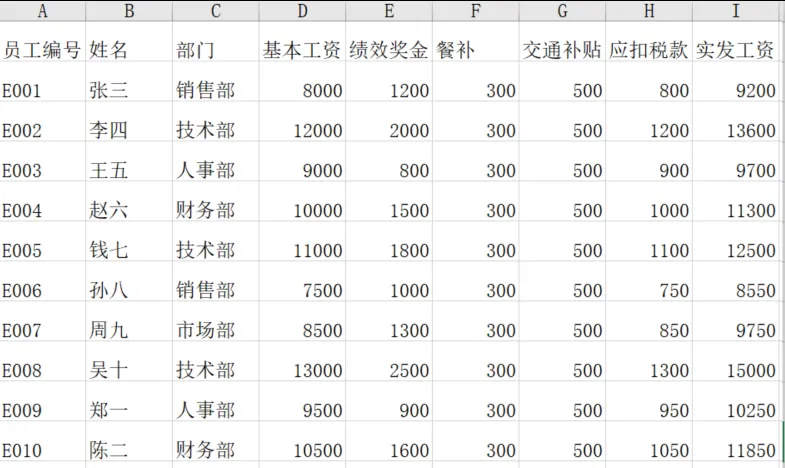
想要实现的效果是 工资条格式,如下图所示 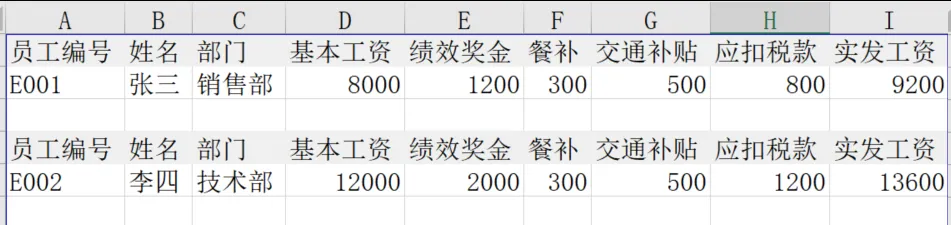
答: 注意: excel的格式必须后缀是XLSM,否则无法运行宏, sheet1由于代码里面固定名字了,sheet名不能改。 最终效果: 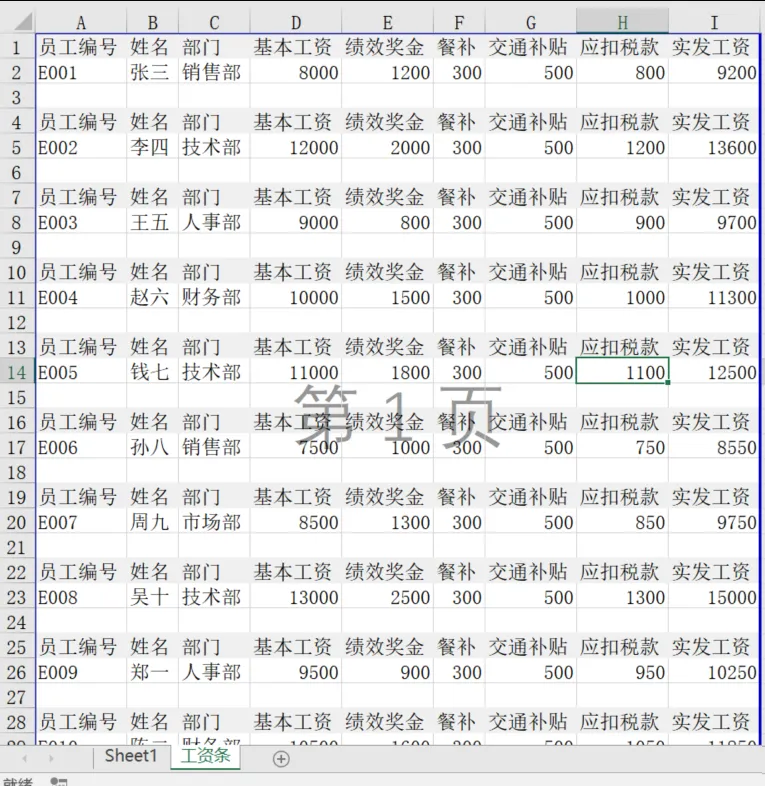
操作步骤:
按 Alt + F11打开VBA编辑器。
点击 “插入” -> “模块”。
在右侧的代码窗口中粘贴以下宏代码:
Sub 生成工资条()Dim wsSource As Worksheet, wsTarget As WorksheetDim i As Long, j As Long, lastRow As Long, lastCol As LongDim targetRow As Long'设置工作表Set wsSource = ThisWorkbook.Worksheets("Sheet1") '源数据表名On Error Resume NextSet wsTarget = ThisWorkbook.Worksheets("工资条")If wsTarget Is Nothing ThenSet wsTarget = ThisWorkbook.Worksheets.Add(After:=wsSource)wsTarget.Name = "工资条"ElsewsTarget.Cells.ClearEnd IfOn Error GoTo 0'获取源数据范围lastRow = wsSource.Cells(wsSource.Rows.Count, 1).End(xlUp).RowlastCol = wsSource.Cells(1, wsSource.Columns.Count).End(xlToLeft).ColumntargetRow = 1'循环每个员工For i = 2 To lastRow'1. 复制标题行wsSource.Range(wsSource.Cells(1, 1), wsSource.Cells(1, lastCol)).Copy _wsTarget.Cells(targetRow, 1)'2. 复制当前员工数据行wsSource.Range(wsSource.Cells(i, 1), wsSource.Cells(i, lastCol)).Copy _wsTarget.Cells(targetRow + 1, 1)targetRow = targetRow + 3 '标题行占1行,数据行占1行,空行占1行Next i'可选:为标题行添加底色For j = 1 To targetRow Step 3wsTarget.Rows(j).Interior.Color = RGB(240, 240, 240) '浅灰色Next jwsTarget.Columns.AutoFitwsTarget.ActivateMsgBox "工资条生成完成!共生成 " & (lastRow - 1) & " 位员工的工资条。", vbInformationEnd Sub
关闭VBA编辑器,返回Excel。
按 Alt + F8打开宏对话框,选择“生成工资条”并运行。
本文来自网友投稿或网络内容,如有侵犯您的权益请联系我们删除,联系邮箱:wyl860211@qq.com 。

