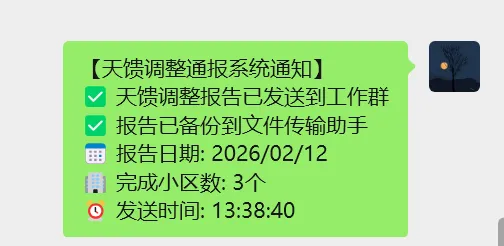
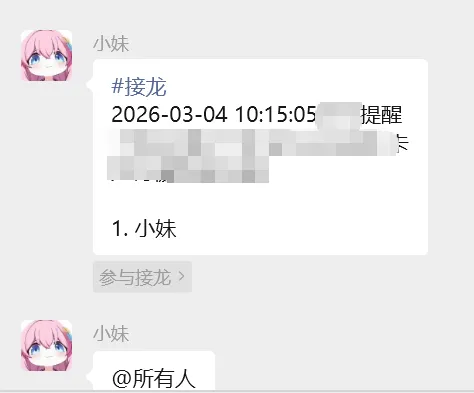
# 读取天馈调整表Excel表内容发送到微信群里.pyimport timeimport pyperclipimport win32apiimport win32conimport osimport datetimeimport pandas as pdfrom ctypes import windll# ======== Excel节假日判断功能 ==========class ExcelHolidayChecker: def __init__(self, excel_file="2026年法定节假日表.xlsx"): self.excel_file = excel_file self.holidays = {} self.working_weekends = [] self.load_holidays_from_excel() def load_holidays_from_excel(self): """从Excel文件加载节假日数据""" try: if not os.path.exists(self.excel_file): print(f"⚠️ 节假日文件不存在: {self.excel_file}") print("将使用默认的2026年节假日配置") self.load_default_holidays() return # 读取法定节假日 holidays_df = pd.read_excel(self.excel_file, sheet_name='法定节假日') for _, row in holidays_df.iterrows(): date_str = str(row['日期'])[:10] # 取日期部分 self.holidays[date_str] = row['节假日名称'] # 读取调休工作日 working_weekends_df = pd.read_excel(self.excel_file, sheet_name='调休工作日') for _, row in working_weekends_df.iterrows(): date_str = str(row['日期'])[:10] self.working_weekends.append(date_str) print(f"✅ 成功加载节假日数据: {len(self.holidays)} 个节假日, {len(self.working_weekends)} 个调休工作日") except Exception as e: print(f"❌ 读取节假日文件失败: {e}") print("将使用默认的2026年节假日配置") self.load_default_holidays() def load_default_holidays(self): """加载默认的2026年节假日配置""" self.holidays = { "2026-01-01": "元旦", "2026-02-17": "春节", "2026-02-18": "春节", "2026-02-19": "春节", "2026-02-20": "春节", "2026-02-21": "春节", "2026-02-22": "春节", "2026-02-23": "春节", "2026-04-05": "清明节", "2026-05-01": "劳动节", "2026-05-02": "劳动节", "2026-05-03": "劳动节", "2026-06-19": "端午节", "2026-06-20": "端午节", "2026-06-21": "端午节", "2026-09-25": "中秋节", "2026-09-26": "中秋节", "2026-09-27": "中秋节", "2026-10-01": "国庆节", "2026-10-02": "国庆节", "2026-10-03": "国庆节", "2026-10-04": "国庆节", "2026-10-05": "国庆节", "2026-10-06": "国庆节", "2026-10-07": "国庆节", } self.working_weekends = ["2026-02-15", "2026-02-28", "2026-10-10"] def is_holiday(self, date_obj=None): """判断指定日期是否为法定节假日""" if date_obj is None: date_obj = datetime.datetime.now() date_str = date_obj.strftime('%Y-%m-%d') # 如果是调休工作日,不算节假日 if date_str in self.working_weekends: return False # 如果是法定节假日 if date_str in self.holidays: return True # 如果是周末且不是调休工作日 if date_obj.weekday() >= 5: return True return False def is_working_day(self, date_obj=None): """判断指定日期是否为工作日""" return not self.is_holiday(date_obj) def get_holiday_info(self, date_obj=None): """获取节假日信息""" if date_obj is None: date_obj = datetime.datetime.now() date_str = date_obj.strftime('%Y-%m-%d') if date_str in self.holidays: return f"法定节假日: {self.holidays[date_str]}" elif date_str in self.working_weekends: return "调休工作日" else: if date_obj.weekday() >= 5: return "周末" else: return "工作日"# ===== 检查是否应该执行 =====def check_if_should_run(): """检查今天是否应该执行程序""" # 初始化节假日检查器 checker = ExcelHolidayChecker("2026年法定节假日表.xlsx") today = datetime.datetime.now() holiday_info = checker.get_holiday_info(today) print(f"今天是: {today.strftime('%Y-%m-%d %A')}") print(f"日期类型: {holiday_info}") # 如果是节假日,则不执行主程序 if checker.is_holiday(): print("⚠️ 今天是法定节假日,不发送工作通知,程序退出") return False, holiday_info # 只有工作日才执行主程序 print("✅ 今天是工作日,开始执行工作任务...") return True, holiday_info# ====== 天馈调整Excel处理功能 ======def process_tiankui_excel(): """处理天馈调整表,返回处理结果""" # 1. 定义文件路径 file_path = r"E:\Wechat_XiaoMei_Notice\wps截图通报\天馈调整表.xlsx" # 检查文件是否存在 if not os.path.exists(file_path): print(f"❌ 错误:未找到文件 '{file_path}'") return None, 0, "" # 2. 获取动态日期 today = datetime.datetime.now() target_date = today.strftime('%Y/%m/%d') print(f"📅 正在分析天馈调整表,日期: {target_date}") # target_date = "2026/02/12" try: # 3. 读取Excel文件 try: df = pd.read_excel(file_path, sheet_name=1, dtype=str) except: xls = pd.ExcelFile(file_path) sheet_name = None for name in xls.sheet_names: if '天馈' in name: sheet_name = name break if not sheet_name: sheet_name = xls.sheet_names[0] df = pd.read_excel(file_path, sheet_name=sheet_name, dtype=str) # 4. 智能查找列名 col_map = {} for col in df.columns: if '小区名称' in str(col): col_map['cell_name'] = col if '是否完成调整(只填是和否)' in str(col): col_map['completed'] = col if '调整日期' in str(col): col_map['date'] = col # 检查是否找到必要列 if not all(k in col_map for k in ['cell_name', 'completed', 'date']): print("❌ 错误:未能识别到必要的列") return None, 0, "" # 5. 数据筛选 print(f"🔍 正在筛选日期为 '{target_date}' 且状态为 '是' 的数据...") try: # 将日期列转换为 datetime 类型 df[col_map['date']] = pd.to_datetime(df[col_map['date']], errors='coerce') target_dt = pd.to_datetime(target_date) # 筛选条件 mask = (df[col_map['date']].dt.date == target_dt.date()) & \ (df[col_map['completed']].str.strip() == '是') filtered_df = df[mask] except Exception as e: print(f"⚠️ 日期转换失败: {e}") return None, 0, "" # 6. 生成结果 if len(filtered_df) > 0: cell_names = [] for index, row in filtered_df.iterrows(): cell_names.append(row[col_map['cell_name']]) # 生成报告内容 report_date = target_date.replace('/', '年', 1).replace('/', '月', 1) + '日' report = f"龙汕区-投诉天馈完成进度通报_{report_date}\n" report += f"{report_date}当天完成小区调整如下:\n\n" for i, cell in enumerate(cell_names, 1): report += f"{i}. {cell}\n" report += f"\n✅ 今日共完成 {len(cell_names)} 个小区的调整" return report, len(cell_names), target_date else: report_date = target_date.replace('/', '年', 1).replace('/', '月', 1) + '日' report = f"龙汕区-投诉天馈完成进度通报_{report_date}\n" report += f"⚠️ 提示:\n 今天完成小区调整为0\n" report += f"请注意进度,及时完成计划内的小区调整工作。" return report, 0, target_date except Exception as e: print(f"❌ 处理天馈调整表时发生错误: {e}") return None, 0, ""# ===== 微信操作功能 =====def open_app(app_dir): """打开微信应用""" os.startfile(app_dir)def send_message_to_contact(contact_name, message): """发送消息给指定联系人""" # 打开搜索框 win32api.keybd_event(17, 0, 0, 0) # Ctrl win32api.keybd_event(70, 0, 0, 0) # F win32api.keybd_event(17, 0, win32con.KEYEVENTF_KEYUP, 0) win32api.keybd_event(70, 0, win32con.KEYEVENTF_KEYUP, 0) time.sleep(1) # 输入联系人 pyperclip.copy(contact_name) win32api.keybd_event(17, 0, 0, 0) # Ctrl win32api.keybd_event(86, 0, 0, 0) # V win32api.keybd_event(86, 0, win32con.KEYEVENTF_KEYUP, 0) win32api.keybd_event(17, 0, win32con.KEYEVENTF_KEYUP, 0) time.sleep(1) # 回车选择联系人 win32api.keybd_event(13, 0, 0, 0) # Enter win32api.keybd_event(13, 0, win32con.KEYEVENTF_KEYUP, 0) time.sleep(1) # 发送消息 pyperclip.copy(message) win32api.keybd_event(17, 0, 0, 0) # Ctrl win32api.keybd_event(86, 0, 0, 0) # V win32api.keybd_event(86, 0, win32con.KEYEVENTF_KEYUP, 0) win32api.keybd_event(17, 0, win32con.KEYEVENTF_KEYUP, 0) time.sleep(0.5) # Enter键发送 win32api.keybd_event(13, 0, 0, 0) # Enter win32api.keybd_event(13, 0, win32con.KEYEVENTF_KEYUP, 0) print(f"📤 已发送给 {contact_name}: {message[:50]}...") time.sleep(1)def send_group_lottery(contact_name, lottery_title, lottery_content): """ 发送微信群接龙 contact_name: 群名或联系人 lottery_title: 接龙标题 lottery_content: 接龙内容 """ print(f"开始发送群接龙到 {contact_name}...") # 打开搜索框 win32api.keybd_event(17, 0, 0, 0) # Ctrl win32api.keybd_event(70, 0, 0, 0) # F win32api.keybd_event(17, 0, win32con.KEYEVENTF_KEYUP, 0) win32api.keybd_event(70, 0, win32con.KEYEVENTF_KEYUP, 0) time.sleep(1) # 输入联系人 pyperclip.copy(contact_name) win32api.keybd_event(17, 0, 0, 0) # Ctrl win32api.keybd_event(86, 0, 0, 0) # V win32api.keybd_event(86, 0, win32con.KEYEVENTF_KEYUP, 0) win32api.keybd_event(17, 0, win32con.KEYEVENTF_KEYUP, 0) time.sleep(1) # 回车选择联系人 win32api.keybd_event(13, 0, 0, 0) # Enter win32api.keybd_event(13, 0, win32con.KEYEVENTF_KEYUP, 0) time.sleep(2) # 输入#号(Shift+3) win32api.keybd_event(16, 0, 0, 0) # Shift win32api.keybd_event(51, 0, 0, 0) # 3(对应#号) win32api.keybd_event(51, 0, win32con.KEYEVENTF_KEYUP, 0) win32api.keybd_event(16, 0, win32con.KEYEVENTF_KEYUP, 0) time.sleep(0.5) # 输入"接龙"二字 pyperclip.copy("接龙") win32api.keybd_event(17, 0, 0, 0) # Ctrl win32api.keybd_event(86, 0, 0, 0) # V win32api.keybd_event(86, 0, win32con.KEYEVENTF_KEYUP, 0) win32api.keybd_event(17, 0, win32con.KEYEVENTF_KEYUP, 0) time.sleep(1) # 按2次向下箭头确保选中第一个选项 for _ in range(2): win32api.keybd_event(40, 0, 0, 0) # 向下箭头 win32api.keybd_event(40, 0, win32con.KEYEVENTF_KEYUP, 0) time.sleep(0.3) win32api.keybd_event(13, 0, 0, 0) # Enter确认选择 win32api.keybd_event(13, 0, win32con.KEYEVENTF_KEYUP, 0) # 等待接龙编辑界面弹出 time.sleep(1) # 输入接龙标题 pyperclip.copy(lottery_title) win32api.keybd_event(17, 0, 0, 0) # Ctrl win32api.keybd_event(86, 0, 0, 0) # V win32api.keybd_event(86, 0, win32con.KEYEVENTF_KEYUP, 0) win32api.keybd_event(17, 0, win32con.KEYEVENTF_KEYUP, 0) time.sleep(0.5) # 输入接龙内容 pyperclip.copy(lottery_content) win32api.keybd_event(17, 0, 0, 0) # Ctrl win32api.keybd_event(86, 0, 0, 0) # V win32api.keybd_event(86, 0, win32con.KEYEVENTF_KEYUP, 0) win32api.keybd_event(17, 0, win32con.KEYEVENTF_KEYUP, 0) time.sleep(0.5) # 计算屏幕绝对坐标 screen_x = 370 screen_y = 630 print(f"鼠标移动至屏幕坐标: ({screen_x}, {screen_y})") # 移动鼠标 windll.user32.SetCursorPos(screen_x, screen_y) time.sleep(0.5) # 鼠标左键按下和释放 win32api.mouse_event(win32con.MOUSEEVENTF_LEFTDOWN, 0, 0, 0, 0) time.sleep(0.1) win32api.mouse_event(win32con.MOUSEEVENTF_LEFTUP, 0, 0, 0, 0) time.sleep(0.5) print(f"✓ 已成功发送接龙到 {contact_name}") time.sleep(1)def group_at_all_people(): """在群里@所有人""" # 输入@号(Shift+2) win32api.keybd_event(16, 0, 0, 0) # Shift win32api.keybd_event(50, 0, 0, 0) # 2(对应@号) win32api.keybd_event(50, 0, win32con.KEYEVENTF_KEYUP, 0) win32api.keybd_event(16, 0, win32con.KEYEVENTF_KEYUP, 0) time.sleep(0.5) # Enter键选中所有人 win32api.keybd_event(13, 0, 0, 0) # Enter win32api.keybd_event(13, 0, win32con.KEYEVENTF_KEYUP, 0) time.sleep(1) # 第二次按下enter键发送消息 win32api.keybd_event(13, 0, 0, 0) # Enter win32api.keybd_event(13, 0, win32con.KEYEVENTF_KEYUP, 0) time.sleep(1)def exit_to_background(): """退出到后台""" win32api.keybd_event(27, 0, 0, 0) # ESC win32api.keybd_event(27, 0, win32con.KEYEVENTF_KEYUP, 0) time.sleep(0.5)# ===== 主程序 =====if __name__ == "__main__": # 记录开始时间 start_time = datetime.datetime.now() print("=" * 50) print("开始执行微信自动化程序...") print(f"开始时间: {start_time.strftime('%Y-%m-%d %H:%M:%S')}") print("=" * 50) # 1. 检查是否应该执行(节假日判断) # should_run, reason = check_if_should_run() # # if not should_run: # print(f"原因: {reason}") # print("程序退出,不发送任何通知") # print("=" * 50) # exit() # 2. 处理天馈调整Excel表 print("\n" + "=" * 30) print("📊 开始处理天馈调整表") print("=" * 30) tiankui_report, cell_count, report_date = process_tiankui_excel() if tiankui_report is None: print("❌ 处理天馈调整表失败,程序退出") exit() print("✅ 天馈调整表处理完成") # 3. 打开微信应用 app_dir = r'"D:\Program Files\Weixin\Weixin.exe"' print(f"\n📱 正在打开微信应用...") open_app(app_dir) time.sleep(3) # 给微信启动时间 try: # 4. 发送天馈调整报告到工作群 work_group = "测试群" # 修改为你实际的工作群名 print(f"\n📤 正在发送天馈调整报告到 {work_group}...") send_message_to_contact(work_group, tiankui_report) # 如果需要@所有人,取消下面的注释 # time.sleep(1) # group_at_all_people() # 5. 发送天馈调整报告到文件传输助手(备份) # print(f"\n📤 正在发送天馈调整报告到文件传输助手(备份)...") # send_message_to_contact('文件传输助手', tiankui_report) # 6. 发送接龙提醒(可选) # if cell_count > 0: # print(f"\n📅 正在发送接龙提醒到 {work_group}...") # lottery_title = f"【{report_date}天馈调整完成确认】\n" # lottery_content = f"请已完成天馈调整的同事在接龙中确认。今日共完成{cell_count}个小区。" # send_group_lottery(work_group, lottery_title, lottery_content) # else: # print(f"\n📅 今日无天馈调整完成,跳过接龙发送") # 7. 发送执行确认消息 confirmation_msg = (f"【天馈调整通报系统通知】\n" f"✅ 天馈调整报告已发送到工作群\n" f"✅ 报告已备份到文件传输助手\n" f"📅 报告日期: {report_date}\n" f"🏢 完成小区数: {cell_count}个\n" f"⏰ 发送时间: {datetime.datetime.now().strftime('%H:%M:%S')}") send_message_to_contact('文件传输助手', confirmation_msg) exit_to_background() except Exception as e: print(f"❌ 发送微信消息时出错: {e}") # 发送错误通知到文件传输助手 error_msg = f"【天馈调整通报系统错误】\n❌ 发送失败: {str(e)}\n⏰ 时间: {datetime.datetime.now().strftime('%H:%M:%S')}" try: send_message_to_contact('文件传输助手', error_msg) except: print("无法发送错误消息") # 计算执行时间 end_time = datetime.datetime.now() duration = (end_time - start_time).total_seconds() print("\n" + "=" * 50) print(f"程序执行完成!") print(f"开始时间: {start_time.strftime('%H:%M:%S')}") print(f"结束时间: {end_time.strftime('%H:%M:%S')}") print(f"总耗时: {duration:.2f} 秒") print(f"天馈调整完成小区数: {cell_count} 个") print("=" * 50)
 10个月宝宝每天需要喝多少奶粉?

