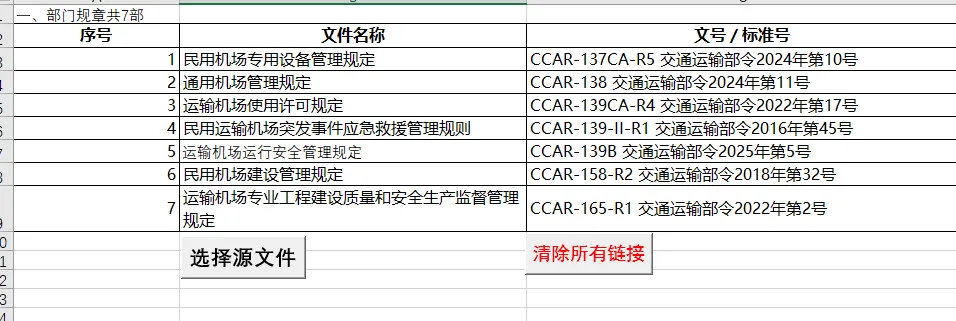
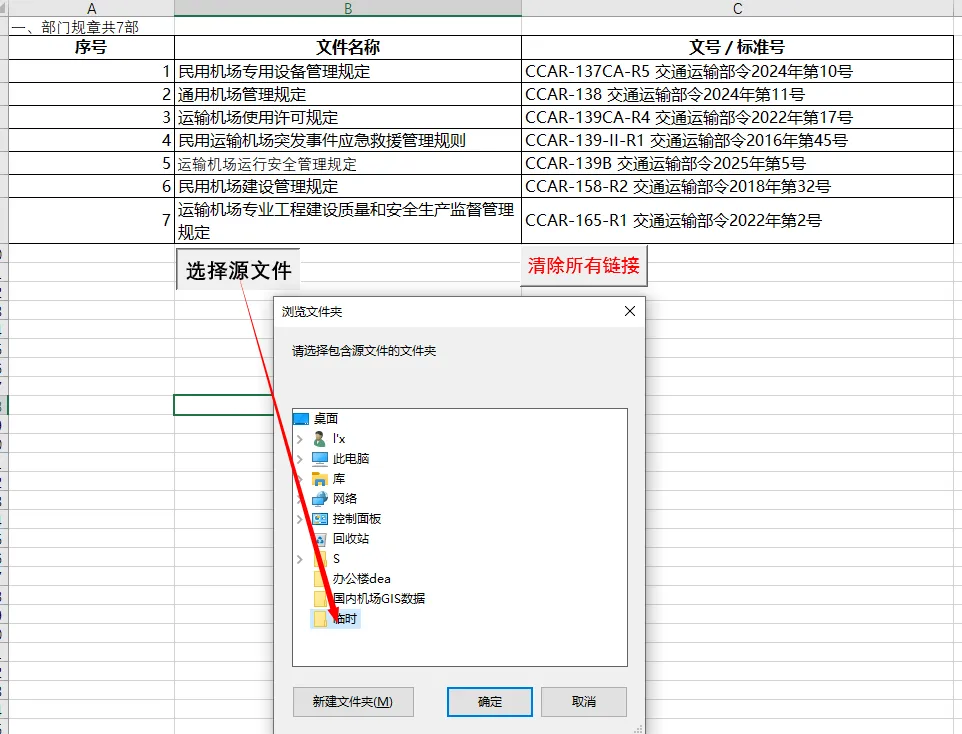
使用场景,为excel工作表内整理的规范目录添加链接,方便随时查阅原文内容。
Option Explicit
' 主程序:为活动工作表的单元格创建文件链接
Sub LinkFilesToCells()
Dim folderPath As String
Dim ws As Worksheet
Dim rng As Range
Dim cell As Range
Dim fileName As String
Dim filePath As String
Dim fileExtensions As Variant
Dim ext As Variant
Dim fileFound As Boolean
Dim lastRow As Long, lastCol As Long
Dim startRow As Long, startCol As Long
Dim endRow As Long, endCol As Long
Dim totalCells As Long, processed As Long
' 设置要搜索的文件扩展名(可根据需要修改)
fileExtensions = Array(".pdf", ".doc", ".docx", ".xls", ".xlsx", ".txt", ".jpg", ".png", ".ppt", ".pptx")
' 获取用户选择的文件夹路径
folderPath = BrowseForFolder("请选择包含源文件的文件夹")
If folderPath = "" Then Exit Sub
' 设置工作表和搜索范围
Set ws = ActiveSheet
Application.ScreenUpdating = False
Application.Cursor = xlWait
' 确定工作表的有效数据范围
lastRow = ws.Cells.Find("*", SearchOrder:=xlByRows, SearchDirection:=xlPrevious).Row
lastCol = ws.Cells.Find("*", SearchOrder:=xlByColumns, SearchDirection:=xlPrevious).Column
' 提示用户选择处理范围
On Error Resume Next
Set rng = Application.InputBox( _
"请选择要处理的单元格区域(如A1:C10),或取消以处理整个工作表", _
"选择范围", _
ws.Range(ws.Cells(1, 1), ws.Cells(lastRow, lastCol)).Address, _
Type:=8)
On Error GoTo 0
If rng Is Nothing Then
' 用户取消选择,使用整个数据范围
Set rng = ws.Range(ws.Cells(1, 1), ws.Cells(lastRow, lastCol))
End If
' 进度提示
totalCells = rng.Cells.Count
processed = 0
' 遍历每个单元格
For Each cell In rng
If Len(Trim(cell.Value)) > 0 Then ' 只处理非空单元格
fileName = Trim(cell.Value)
fileFound = False
' 尝试各种可能的文件扩展名
For Each ext In fileExtensions
filePath = folderPath & "\" & fileName & ext
If Dir(filePath) <> "" Then ' 文件存在
' 创建超链接
ws.Hyperlinks.Add _
Anchor:=cell, _
Address:=filePath, _
TextToDisplay:=cell.Value, _
ScreenTip:="点击打开: " & fileName & ext
' 可选:添加格式标识(例如改变单元格颜色)
cell.Interior.Color = RGB(220, 240, 255) ' 浅蓝色背景
fileFound = True
Exit For
End If
Next ext
' 如果未找到带扩展名的文件,尝试查找无扩展名的文件
If Not fileFound Then
filePath = folderPath & "\" & fileName
If Dir(filePath) <> "" Then
ws.Hyperlinks.Add _
Anchor:=cell, _
Address:=filePath, _
TextToDisplay:=cell.Value, _
ScreenTip:="点击打开: " & fileName
cell.Interior.Color = RGB(220, 240, 255)
fileFound = True
End If
End If
' 如果未找到任何文件,添加注释提示
If Not fileFound Then
cell.ClearComments
cell.AddComment "未找到文件: " & fileName & vbNewLine & _
"检查路径: " & folderPath
cell.Font.Color = RGB(255, 0, 0) ' 红色文字
End If
End If
' 更新进度
processed = processed + 1
If processed Mod 50 = 0 Then
Application.StatusBar = "处理进度: " & processed & " / " & totalCells & _
" (" & Format(processed / totalCells, "0%") & ")"
DoEvents
End If
Next cell
' 清理
Application.StatusBar = False
Application.ScreenUpdating = True
Application.Cursor = xlDefault
' 显示结果统计
MsgBox "处理完成!" & vbNewLine & _
"已处理单元格: " & totalCells & vbNewLine & _
"文件夹路径: " & folderPath, _
vbInformation, "文件链接完成"
End Sub
' 辅助函数:浏览文件夹对话框
Function BrowseForFolder(Optional Title As String = "请选择一个文件夹") As String
Dim objShell As Object
Dim objFolder As Object
Set objShell = CreateObject("Shell.Application")
Set objFolder = objShell.BrowseForFolder(0, Title, 0, 0)
If Not objFolder Is Nothing Then
BrowseForFolder = objFolder.Self.Path
Else
BrowseForFolder = ""
End If
End Function
' 清理所有超链接和格式
Sub ClearAllHyperlinks()
Dim ws As Worksheet
Dim rng As Range
Dim cell As Range
Dim response As VbMsgBoxResult
Set ws = ActiveSheet
' 确认操作
response = MsgBox("这将清除工作表中的所有超链接和标记格式。" & vbNewLine & _
"是否继续?", vbYesNo + vbQuestion, "确认清理")
If response = vbYes Then
Application.ScreenUpdating = False
' 清除整个工作表的超链接
ws.Cells.Hyperlinks.Delete
' 清除格式和注释
With ws.UsedRange
.Interior.ColorIndex = xlNone
.Font.ColorIndex = xlAutomatic
.ClearComments
End With
Application.ScreenUpdating = True
MsgBox "已清理所有超链接和格式", vbInformation
End If
End Sub
' 快速测试单个单元格
Sub TestSingleCell()
Dim folderPath As String
Dim cell As Range
Dim fileName As String
Dim filePath As String
' 获取文件夹路径
folderPath = BrowseForFolder("请选择包含源文件的文件夹")
If folderPath = "" Then Exit Sub
' 获取用户选择的单元格
On Error Resume Next
Set cell = Application.InputBox("请选择一个单元格进行测试", _
"测试单元格", Type:=8)
On Error GoTo 0
If cell Is Nothing Then Exit Sub
fileName = Trim(cell.Value)
If fileName = "" Then
MsgBox "所选单元格为空", vbExclamation
Exit Sub
End If
' 查找文件(这里简化,仅测试无扩展名)
filePath = folderPath & "\" & fileName
' 先尝试无扩展名
If Dir(filePath) <> "" Then
ActiveSheet.Hyperlinks.Add _
Anchor:=cell, _
Address:=filePath, _
TextToDisplay:=cell.Value
MsgBox "已为文件创建链接: " & filePath, vbInformation
Else
' 尝试常见扩展名
Dim extList As Variant, ext As Variant
extList = Array(".pdf", ".doc", ".docx", ".xls", ".xlsx")
For Each ext In extList
If Dir(filePath & ext) <> "" Then
ActiveSheet.Hyperlinks.Add _
Anchor:=cell, _
Address:=filePath & ext, _
TextToDisplay:=cell.Value
MsgBox "已为文件创建链接: " & fileName & ext, vbInformation
Exit Sub
End If
Next
MsgBox "未找到文件: " & fileName & vbNewLine & _
"在文件夹: " & folderPath, vbExclamation
End If
End Sub